
Appearance
cms
初始化项目
bash
npm install -g @nestjs/cli
nest new cms
创建模块
bash
nest generate module admin
nest generate module api
nest generate module shared
app.module.ts
在app.module.ts中引入模块
typescript
import { Module } from '@nestjs/common';
import { AppController } from './app.controller';
import { AppService } from './app.service';
import { AdminModule } from './admin/admin.module';
import { ApiModule } from './api/api.module';
import { SharedModule } from './shared/shared.module';

@Module({
  imports: [AdminModule, ApiModule, SharedModule],
  controllers: [AppController],
  providers: [AppService],
})
export class AppModule {}
eslint.config.mjs
配置取消eslint换行符警告
js
// @ts-check
import eslint from '@eslint/js';
import eslintPluginPrettierRecommended from 'eslint-plugin-prettier/recommended';
import globals from 'globals';
import tseslint from 'typescript-eslint';

export default tseslint.config(
  {
    ignores: ['eslint.config.mjs'],
  },
  eslint.configs.recommended,
  ...tseslint.configs.recommendedTypeChecked,
  eslintPluginPrettierRecommended,
  {
    languageOptions: {
      globals: {
        ...globals.node,
        ...globals.jest,
      },
      sourceType: 'commonjs',
      parserOptions: {
        projectService: true,
        tsconfigRootDir: import.meta.dirname,
      },
    },
  },
  {
    rules: {
      '@typescript-eslint/no-explicit-any': 'off',
      '@typescript-eslint/no-floating-promises': 'warn',
      '@typescript-eslint/no-unsafe-argument': 'warn',
      'linebreak-style': ['error', 'auto'],
    },
  },
);
支持会话
安装所需库
bash
npm install express-session cookie-parser @nestjs/platform-expressmain.ts
ts
import { NestFactory } from '@nestjs/core';
import session from 'express-session';
import cookieParser from 'cookie-parser';
import { AppModule } from './app.module';

async function bootstrap() {
  const app = await NestFactory.create(AppModule);
  // 配置 cookie 解析器
  app.use(cookieParser());
  // 配置 session
  app.use(
    session({
      secret: 'secret-key',
      resave: true, // 是否每次都重新保存
      saveUninitialized: true, // 是否保存未初始化的会话
      cookie: {
        maxAge: 1000 * 60 * 60 * 24 * 7, // 7天
      },
    }),
  );
  await app.listen(process.env.PORT ?? 3000);
}
bootstrap();
模板
使用的是 handlebars 和 bootstrap
bootstrap 等静态资源放在 public 目录下
安装 handlebars 相关库
bash
npm i express-handlebars控制器
bash
nest generate controller admin/controllers/dashboard --no-spec --flatdashboard.hbs
dashboard.controller.ts
ts
import { Controller, Get, Render } from '@nestjs/common';

@Controller('admin')
export class DashboardController {
  @Get()
  @Render('dashboard')
  dashboard() {
    return { title: 'dashboard' }
  }
}
页面布局
/views/partials/header.hbs
/views/partials/sidebar.hbs
/views/layouts/main.hbs
配置静态资源目录和视图引擎
main.ts
ts
import { NestFactory } from '@nestjs/core';
import session from 'express-session';
import cookieParser from 'cookie-parser';
import { join } from 'node:path';
import { engine } from 'express-handlebars';
import { NestExpressApplication } from '@nestjs/platform-express';
import { AppModule } from './app.module';

async function bootstrap() {
  // 使用 NestFactory 创建一个 NestExpressApplication 实例
  const app = await NestFactory.create<NestExpressApplication>(AppModule);
  // 配置静态资源目录
  app.useStaticAssets(join(__dirname, '..', 'public'));
  // 设置视图文件的基本目录
  app.setBaseViewsDir(join(__dirname, '..', 'views'));
  // 设置视图引擎为 hbs(Handlebars)
  app.set('view engine', 'hbs');
  // 配置 Handlebars 引擎
  app.engine('hbs', engine({
    // 设置文件扩展名为 .hbs
    extname: '.hbs',
    // 配置运行时选项
    runtimeOptions: {
      // 允许默认情况下访问原型属性
      allowProtoPropertiesByDefault: true,
      // 允许默认情况下访问原型方法
      allowProtoMethodsByDefault: true,
    },
  }));
  // 配置 cookie 解析器
  app.use(cookieParser());
  // 配置 session
  app.use(
    session({
      secret: 'secret-key',
      resave: true, // 是否每次都重新保存
      saveUninitialized: true, // 是否保存未初始化的会话
      cookie: {
        maxAge: 1000 * 60 * 60 * 24 * 7, // 7天
      },
    }),
  );
  await app.listen(process.env.PORT ?? 3000);
}
bootstrap();
连接数据库
bash
npm install @nestjs/config @nestjs/typeorm mysql2用户实体 user.entity.ts
src/shared/entities/user.entity.ts
ts
import { Entity, Column, PrimaryGeneratedColumn } from 'typeorm';

@Entity()
export class User {
  @PrimaryGeneratedColumn()
  id: number;

  @Column({ length: 50, unique: true })
  username: string;

  @Column()
  password: string;

  @Column({ length: 15, nullable: true })
  mobile: string;

  @Column({ length: 100, nullable: true })
  email: string;

  @Column({ default: 1 })
  status: number;

  @Column({ default: false })
  is_super: boolean;

  @Column({ default: 100 })
  sort: number;

  @Column({ type: 'timestamp', default: () => 'CURRENT_TIMESTAMP' })
  createdAt: Date;

  @Column({ type: 'timestamp', default: () => 'CURRENT_TIMESTAMP', onUpdate: 'CURRENT_TIMESTAMP' })
  updatedAt: Date;
}
configuration.service
ts
import { Injectable } from '@nestjs/common';
import { ConfigService } from '@nestjs/config';

@Injectable()
export class ConfigurationService {
  constructor(private configService: ConfigService) { }
  get mysqlHost(): string {
    return this.configService.get<string>('MYSQL_HOST')!;
  }
  get mysqlPort(): number {
    return this.configService.get<number>('MYSQL_PORT')!;
  }
  get mysqlDb(): string {
    return this.configService.get<string>('MYSQL_DB')!;
  }
  get mysqlUser(): string {
    return this.configService.get<string>('MYSQL_USER')!;
  }
  get mysqlPass(): string {
    return this.configService.get<string>('MYSQL_PASSWORD')!;
  }
  get mysqlConfig() {
    return {
      host: this.mysqlHost,
      port: this.mysqlPort,
      database: this.mysqlDb,
      username: this.mysqlUser,
      password: this.mysqlPass,
    };
  }
}
环境变量 .env
MYSQL_HOST=localhost
MYSQL_PORT=3306
MYSQL_DB=cms
MYSQL_USER=root
MYSQL_PASSWORD=root
配置数据库连接
share.module.ts
ts
import { Global, Module } from '@nestjs/common';
import { TypeOrmModule } from '@nestjs/typeorm';
import { User } from './entities/user.entity';
import { ConfigModule } from '@nestjs/config';
import { ConfigurationService } from './services/configuration.service';

@Global()
@Module({
  imports: [
    ConfigModule.forRoot({ isGlobal: true }),
    TypeOrmModule.forFeature([User]),
    TypeOrmModule.forRootAsync({
      imports: [ConfigModule],
      inject: [ConfigurationService],
      useFactory: (configService: ConfigurationService) => ({
        type: 'mysql',
        ...configService.mysqlConfig,
        entities: [User],
        synchronize: true,
        autoLoadEntities: true,
        logging: false
      }),
    }),
  ],
  providers: [ConfigurationService],
  exports: [ConfigurationService],
})
export class ShareModule {}
用户接口
生成控制器
bash
nest generate service share/services/user --no-spec --flat
nest generate controller admin/controllers/user --no-spec --flat
基础的curd
mysql-base.service.ts
ts
import { Injectable } from '@nestjs/common';
import { Repository, FindOneOptions, ObjectLiteral, DeepPartial } from 'typeorm';
import { QueryDeepPartialEntity } from 'typeorm/query-builder/QueryPartialEntity.js';

@Injectable()
export abstract class MysqlBaseService<T extends ObjectLiteral> {
  constructor(private readonly repository: Repository<T>) {}

  async findAll(): Promise<T[]> {
    return this.repository.find();
  }
  async findOne(options: FindOneOptions<T>): Promise<T | null> {
    return this.repository.findOne(options);
  }
  async create(createDto: DeepPartial<T>): Promise<T | T[]> {
    const entity = this.repository.create(createDto);
    return this.repository.save(entity);
  }
  async update(id: number, updateDto: QueryDeepPartialEntity<T>) {
    return await this.repository.update(id, updateDto);
  }
  async delete(id: number) {
    return await this.repository.delete(id);
  }
}
controller
user.controller.ts
定义一个接口用于获取所有用户
ts
import { Controller, Get } from '@nestjs/common';
import { UserService } from '../../share/services/user.service';

@Controller('admin/user')
export class UserController {

  constructor(private readonly userService: UserService) {}

  @Get()
  async findAll() {
    const users = await this.userService.findAll();
    return { users };
  }
}
service
user.service.ts
ts
import { Injectable } from '@nestjs/common';
import { MysqlBaseService } from './mysql-base.service';
import { User } from '../entities/user.entity';
import { InjectRepository } from '@nestjs/typeorm';
import { Repository } from 'typeorm';

@Injectable()
export class UserService extends MysqlBaseService<User> {
  constructor(
    @InjectRepository(User)
    protected userRepository: Repository<User>
  ) {
    super(userRepository);
  }
}
用户curd
安装依赖
bash
npm i class-validator class-transformerclass-validator
| 装饰器方法名 | 介绍 |
|---|---|
@IsString() | 验证属性是否为字符串类型。 |
@IsInt() | 验证属性是否为整数类型。 |
@IsBoolean() | 验证属性是否为布尔值类型。 |
@IsNumber() | 验证属性是否为数字类型,可以指定选项,如整数、浮点数等。 |
@IsArray() | 验证属性是否为数组类型。 |
@IsEmail() | 验证属性是否为合法的电子邮件地址。 |
@IsEnum() | 验证属性是否为指定枚举类型中的值。 |
@IsDate() | 验证属性是否为日期类型。 |
@IsOptional() | 如果属性存在则进行验证,否则跳过此验证。 |
@IsNotEmpty() | 验证属性是否不为空(不为 null 或 undefined 且不为空字符串)。 |
@IsEmpty() | 验证属性是否为空(null 或 undefined 或为空字符串)。 |
@IsDefined() | 验证属性是否已定义(不为 undefined)。 |
@Min() | 验证属性的值是否大于或等于指定的最小值。 |
@Max() | 验证属性的值是否小于或等于指定的最大值。 |
@MinLength() | 验证字符串属性的长度是否大于或等于指定的最小长度。 |
@MaxLength() | 验证字符串属性的长度是否小于或等于指定的最大长度。 |
@Length() | 验证字符串属性的长度是否在指定的范围内。 |
@Matches() | 验证字符串属性是否符合指定的正则表达式。 |
@IsUUID() | 验证属性是否为合法的 UUID 格式。 |
@IsUrl() | 验证属性是否为合法的 URL 格式。 |
@IsIn() | 验证属性是否为给定值数组中的一个。 |
@IsNotIn() | 验证属性是否不在给定值数组中。 |
@IsPositive() | 验证数字属性是否为正数。 |
@IsNegative() | 验证数字属性是否为负数。 |
@IsLatitude() | 验证属性是否为合法的纬度值(范围:-90 到 90)。 |
@IsLongitude() | 验证属性是否为合法的经度值(范围:-180 到 180)。 |
@IsPhoneNumber() | 验证属性是否为合法的电话号码,支持不同国家的格式。 |
@IsCreditCard() | 验证属性是否为有效的信用卡号。 |
@IsISO8601() | 验证属性是否为合法的 ISO 8601 日期格式。 |
@IsJSON() | 验证属性是否为合法的 JSON 字符串。 |
@IsIP() | 验证属性是否为合法的 IP 地址,可以指定版本(IPv4 或 IPv6)。 |
@IsPostalCode() | 验证属性是否为合法的邮政编码,支持不同国家的格式。 |
@IsHexColor() | 验证属性是否为合法的十六进制颜色代码。 |
@IsCurrency() | 验证属性是否为合法的货币金额格式。 |
@IsAlphanumeric() | 验证属性是否仅包含字母和数字。 |
@IsAlpha() | 验证属性是否仅包含字母。 |
@IsLowercase() | 验证属性是否全部为小写字母。 |
@IsUppercase() | 验证属性是否全部为大写字母。 |
@IsBase64() | 验证属性是否为合法的 Base64 编码字符串。 |
@IsDateString() | 验证属性是否为合法的日期字符串。 |
@IsFQDN() | 验证属性是否为合法的完全合格域名(FQDN)。 |
@IsMilitaryTime() | 验证属性是否为合法的 24 小时时间格式(军事时间)。 |
@IsMongoId() | 验证属性是否为合法的 MongoDB ObjectId。 |
@IsPort() | 验证属性是否为合法的端口号(范围:0 到 65535)。 |
@IsISBN() | 验证属性是否为合法的 ISBN 格式。 |
@IsISSN() | 验证属性是否为合法的 ISSN 格式。 |
@IsRFC3339() | 验证属性是否为合法的 RFC 3339 日期格式。 |
@IsBIC() | 验证属性是否为合法的银行标识代码(BIC)。 |
@IsJWT() | 验证属性是否为合法的 JSON Web Token(JWT)。 |
@IsEAN() | 验证属性是否为合法的欧洲商品编号(EAN)。 |
@IsMACAddress() | 验证属性是否为合法的 MAC 地址。 |
@IsHexadecimal() | 验证属性是否为合法的十六进制数值。 |
@IsTimeZone() | 验证属性是否为合法的时区名称。 |
@IsStrongPassword() | 验证属性是否为强密码,支持自定义验证条件(如长度、字符类型)。 |
@IsISO31661Alpha2() | 验证属性是否为合法的 ISO 3166-1 Alpha-2 国家代码。 |
@IsISO31661Alpha3() | 验证属性是否为合法的 ISO 3166-1 Alpha-3 国家代码。 |
@IsEAN13() | 验证属性是否为合法的 EAN-13 格式。 |
@IsEAN8() | 验证属性是否为合法的 EAN-8 格式。 |
@IsISRC() | 验证属性是否为合法的国际标准录音代码(ISRC)。 |
@IsISO4217() | 验证属性是否为合法的 ISO 4217 货币代码。 |
@IsIBAN() | 验证属性是否为合法的国际银行帐号(IBAN)。 |
@IsRFC4180() | 验证属性是否为合法的 RFC 4180 CSV 格式。 |
@IsISO6391() | 验证属性是否为合法的 ISO 639-1 语言代码。 |
@IsISIN() | 验证属性是否为合法的国际证券识别码(ISIN)。 |
| 名称 | 介绍 |
|---|---|
ValidatorConstraint | 装饰器,用于定义自定义验证器。可以指定验证器名称和是否为异步。 |
ValidatorConstraintInterface | 接口,用于实现自定义验证器的逻辑。需要实现 validate 和 defaultMessage 方法。 |
ValidationArguments | 类,用于传递给验证器的参数信息,包括当前被验证的对象、属性、约束和目标对象等。 |
registerDecorator | 函数,用于注册自定义装饰器,可以指定目标对象、属性、验证器和其他选项。 |
ValidationOptions | 接口,用于指定验证选项,如消息、组、每个属性的条件等。 |
@nestjs/mapped-types
| 方法名 | 介绍 |
|---|---|
PartialType | 用于将给定类型的所有属性设置为可选属性,通常用于更新操作。 |
PickType | 用于从给定类型中选择特定的属性来构建一个新类型,只包含选中的属性。 |
OmitType | 用于从给定类型中排除特定的属性来构建一个新类型,排除指定的属性。 |
IntersectionType | 用于将多个类型合并成一个新类型,包含所有类型的属性。 |
MappedType | 是一个抽象类型,允许对 DTO 进行进一步扩展或自定义。通常与其他工具一起使用,直接使用较少。 |
@nestjs/swagger
| 装饰器名称 | 介绍 |
|---|---|
@ApiTags | 用于给控制器或模块添加标签,用于对 API 进行分类。 |
@ApiOperation | 用于描述单个操作的目的和功能,通常用于描述控制器中的方法。 |
@ApiResponse | 用于指定 API 响应的状态码及其描述,支持定义多个响应。 |
@ApiParam | 用于描述路径参数,包括名称、类型和描述。 |
@ApiQuery | 用于描述查询参数(即 URL 中的 ?key=value 部分),包括名称、类型和描述。 |
@ApiBody | 用于描述请求体的结构,通常用于 POST 和 PUT 请求。 |
@ApiHeader | 用于描述 HTTP 头信息,包括名称、类型和描述。 |
@ApiBearerAuth | 用于描述使用 Bearer Token 的身份验证方式。 |
@ApiCookieAuth | 用于描述基于 Cookie 的身份验证方式。 |
@ApiBasicAuth | 用于描述基本身份验证方式。 |
@ApiExcludeEndpoint | 用于从 Swagger 文档中排除某个特定的控制器方法。 |
@ApiProduces | 用于指定 API 方法返回的数据格式,如 application/json。 |
@ApiConsumes | 用于指定 API 方法可以消费的数据格式,如 application/json。 |
@ApiExtraModels | 用于引入额外的模型类,通常用于复杂的响应或嵌套对象。 |
@ApiHideProperty | 用于从模型类中排除某些属性,使其不在 Swagger 文档中显示。 |
@ApiSecurity | 用于为控制器方法指定安全机制,如 OAuth2。 |
@ApiExcludeController | 用于从 Swagger 文档中排除整个控制器。 |
@ApiImplicitParam | (已弃用)用于描述隐式的路径参数,建议使用 @ApiParam 代替。 |
@ApiImplicitQuery | (已弃用)用于描述隐式的查询参数,建议使用 @ApiQuery 代替。 |
@ApiImplicitHeader | (已弃用)用于描述隐式的头信息,建议使用 @ApiHeader 代替。 |
@ApiImplicitBody | (已弃用)用于描述隐式的请求体,建议使用 @ApiBody 代替。 |
class-transformer
| 装饰器名称 | 介绍 |
|---|---|
@Exclude() | 将目标属性从序列化输出中排除,使其不被包含在最终的序列化结果中。 |
@Expose() | 将目标属性包括在序列化输出中,或者重命名序列化结果中的属性。 |
@Transform() | 提供自定义的转换逻辑,可以在序列化或反序列化过程中对属性进行转换。 |
@Type() | 显式指定属性的类型,通常用于在序列化或反序列化过程中确保正确的类型转换,尤其是在数组或对象中。 |
@TransformPlainToClass() | 将普通对象转换为类实例,使用此装饰器可以自动执行该转换。 |
@TransformClassToPlain() | 将类实例转换为普通对象,使用此装饰器可以自动执行该转换。 |
@TransformClassToClass() | 将一个类实例转换为另一个类实例,通常用于创建副本并在转换过程中应用特定规则。 |
ClassSerializerInterceptor
ClassSerializerInterceptor 是一个内置的拦截器,用于在数据响应之前对数据进行序列化处理。它利用了 class-transformer 库,能够根据类定义中的装饰器(例如 @Exclude 和 @Expose)来自动转换类实例。这对确保敏感数据不会在 API 响应中暴露非常有用。
功能和用途:
- 自动序列化:拦截控制器方法的返回值,并将类实例序列化为普通对象。
- 属性控制:通过使用
class-transformer装饰器(如@Exclude、@Expose),可以精细控制哪些属性会被序列化和暴露。 - 安全性:能够防止敏感数据(如密码)在 API 响应中被不小心暴露。
- 嵌套处理:能够处理嵌套的对象和数组,保证整个数据结构的序列化规则一致。
SerializeOptions
SerializeOptions 是一个装饰器,通常与 ClassSerializerInterceptor 一起使用。它允许你为整个控制器或特定的控制器方法设置序列化选项,进一步定制序列化行为。
功能和用途:
- 定制化策略:你可以为序列化设置不同的策略,例如
exposeAll或excludeAll,来决定默认情况下是包含还是排除类的所有属性。 - 分组控制:可以为不同的序列化场景设置不同的组(groups),使得同一个类在不同场景下可以以不同的方式序列化。
生成控制器
bash
nest generate controller api/controllers/user --no-spec --flat自定义装饰器
alidation-and-transform.decorators.ts
ts
import { applyDecorators } from "@nestjs/common";
import { Type } from "class-transformer";
import { IsBoolean, IsEmail, IsNumber, IsOptional, IsString } from "class-validator";

// 可选字符串
export function IsOptionalString() {
  return applyDecorators(IsOptional(), IsString())
}

// 可选邮箱
export function IsOptionalEmail() {
  return applyDecorators(IsOptional(), IsEmail())
}

// 可选数字 并转换为数字
export function IsOptionalNumber() {
  return applyDecorators(IsOptional(), IsNumber(), Type(() => Number))
}

// 可选布尔值 并转换为布尔值
export function IsOptionalBoolean() {
  return applyDecorators(IsOptional(), IsBoolean(), Type(() => Boolean))
}
自定义验证器
user-validators.ts
ts
import { Injectable } from "@nestjs/common";
import { registerDecorator, ValidationArguments, ValidationOptions, ValidatorConstraint, ValidatorConstraintInterface, } from "class-validator";

// 定义一个自定义验证器,名为 'startsWith',不需要异步验证
@ValidatorConstraint({ name: 'startsWith', async: false })
// 使用 Injectable 装饰器使这个类可被依赖注入
@Injectable()
// 定义 StartsWithConstraint 类并实现 ValidatorConstraintInterface 接口
export class StartsWithConstraint implements ValidatorConstraintInterface {
  // 定义验证逻辑,检查值是否以指定的前缀开头
  validate(value: any, args: ValidationArguments) {
    const [prefix] = args.constraints;
    return typeof value === 'string' && value.startsWith(prefix);
  }
  // 定义默认消息,当验证失败时返回的错误信息
  defaultMessage(args: ValidationArguments) {
    const [prefix] = args.constraints;
    return `${args.property} must start with ${prefix}`;
  }
}

// 定义一个自定义验证器,名为 'isUsernameUnique',需要异步验证
@ValidatorConstraint({ name: 'isUsernameUnique', async: true })
// 使用 Injectable 装饰器使这个类可被依赖注入
@Injectable()
// 定义 IsUsernameUniqueConstraint 类并实现 ValidatorConstraintInterface 接口
export class IsUsernameUniqueConstraint implements ValidatorConstraintInterface {
  // 定义验证逻辑,检查用户名是否唯一
  async validate(value: any, args: ValidationArguments) {
    const existingUsernames = ['ADMIN', 'USER', 'GUEST']; // 模拟已存在的用户名列表
    return !existingUsernames.includes(value);
  }
  // 定义默认消息,当验证失败时返回的错误信息
  defaultMessage(args: ValidationArguments) {
    return `${args.property} must be unique`;
  }
}

// 创建 StartsWith 装饰器工厂函数,用于给属性添加 'startsWith' 验证逻辑
export function StartsWith(prefix: string, validationOptions?: ValidationOptions) {
  return function (object: Object, propertyName: string) {
    registerDecorator({
      target: object.constructor, // 目标类
      propertyName: propertyName, // 目标属性名
      options: validationOptions, // 验证选项
      constraints: [prefix], // 传递给验证器的参数,如前缀
      validator: StartsWithConstraint, // 指定使用的验证器类
    });
  };
}

// 创建 IsUsernameUnique 装饰器工厂函数,用于给属性添加 'isUsernameUnique' 验证逻辑
export function IsUsernameUnique(validationOptions?: ValidationOptions) {
  return function (object: Object, propertyName: string) {
    registerDecorator({
      target: object.constructor, // 目标类
      propertyName: propertyName, // 目标属性名
      options: validationOptions, // 验证选项
      constraints: [], // 传递给验证器的参数,这里不需要
      validator: IsUsernameUniqueConstraint, // 指定使用的验证器类
    });
  };
}
返回结果共用vo
vo/result.ts
ts
import { ApiProperty } from '@nestjs/swagger';

export class Result {

  @ApiProperty({ description: '操作是否成功', example: true })
  public success: boolean;

  @ApiProperty({ description: '操作的消息或错误信息', example: '操作成功' })
  public message: string;
  constructor(success: boolean, message?: string) {
    this.success = success;
    this.message = message || '';
  }

  static success(message: string) {
    return new Result(true, message);
  }

  static fail(message: string) {
    return new Result(false, message);
  }
}
配置 swagger 文档
main.ts
ts
import { NestFactory } from '@nestjs/core';
import session from 'express-session';
import cookieParser from 'cookie-parser';
import { join } from 'node:path';
import { engine } from 'express-handlebars';
import { NestExpressApplication } from '@nestjs/platform-express';
import { AppModule } from './app.module';
import { DocumentBuilder, SwaggerModule } from '@nestjs/swagger';
import { ValidationPipe } from '@nestjs/common';

async function bootstrap() {
  // 使用 NestFactory 创建一个 NestExpressApplication 实例
  const app = await NestFactory.create<NestExpressApplication>(AppModule);
  // 配置静态资源目录
  app.useStaticAssets(join(__dirname, '..', 'public'));
  // 设置视图文件的基本目录
  app.setBaseViewsDir(join(__dirname, '..', 'views'));
  // 设置视图引擎为 hbs(Handlebars)
  app.set('view engine', 'hbs');
  // 配置 Handlebars 引擎
  app.engine('hbs', engine({
    // 设置文件扩展名为 .hbs
    extname: '.hbs',
    // 配置运行时选项
    runtimeOptions: {
      // 允许默认情况下访问原型属性
      allowProtoPropertiesByDefault: true,
      // 允许默认情况下访问原型方法
      allowProtoMethodsByDefault: true,
    },
  }));
  // 配置 cookie 解析器
  app.use(cookieParser());
  // 配置 session
  app.use(
    session({
      secret: 'secret-key',
      resave: true, // 是否每次都重新保存
      saveUninitialized: true, // 是否保存未初始化的会话
      cookie: {
        maxAge: 1000 * 60 * 60 * 24 * 7, // 7天
      },
    }),
  );
  // 配置全局管道
  app.useGlobalPipes(new ValidationPipe({ transform: true }));
  // 配置 Swagger
  const config = new DocumentBuilder()
    // 设置标题
    .setTitle('CMS API')
    // 设置描述
    .setDescription('CMS API Description')
    // 设置版本
    .setVersion('1.0')
    // 设置标签
    .addTag('CMS')
    // 设置Cookie认证
    .addCookieAuth('connect.sid')
    // 设置Bearer认证
    .addBearerAuth({ type: 'http', scheme: 'bearer' })
    // 构建配置
    .build();
  // 使用配置对象创建 Swagger 文档
  const document = SwaggerModule.createDocument(app, config);
  // 设置 Swagger 模块的路径和文档对象,将 Swagger UI 绑定到 '/api-doc' 路径上
  SwaggerModule.setup('api-doc', app, document);
  await app.listen(process.env.PORT ?? 3000);
}
bootstrap();
给控制器和实体增加一些 swagger 描述
admin/controller/user.controller
ts
import { Controller, Get } from '@nestjs/common';
import { UserService } from '../../share/services/user.service';
import { ApiOperation, ApiResponse, ApiTags } from '@nestjs/swagger';

@ApiTags('admin/user')
@Controller('admin/user')
export class UserController {

  constructor(private readonly userService: UserService) {}

  @Get()
  @ApiOperation({ summary: '获取所有用户列表(管理后台)' })
  @ApiResponse({ status: 200, description: '成功返回用户列表' })
  async findAll() {
    const users = await this.userService.findAll();
    return { users };
  }
}
admin/controller/dashboard.controller
ts
import { Controller, Get, Render } from '@nestjs/common';
import { ApiCookieAuth, ApiOperation, ApiResponse, ApiTags } from '@nestjs/swagger';

@ApiTags('admin/dashboard')
@Controller('admin')
export class DashboardController {
  @Get()
  @ApiCookieAuth()
  @ApiOperation({ summary: '管理后台仪表盘' })
  @ApiResponse({ status: 200, description: '成功返回仪表盘页面' })
  @Render('dashboard')
  dashboard() {
    return { title: 'dashboard' }
  }
}
entities/user.entity
ts
import { ApiHideProperty, ApiProperty } from '@nestjs/swagger';
import { Exclude, Transform } from 'class-transformer';
import { Entity, Column, PrimaryGeneratedColumn } from 'typeorm';

@Entity()
export class User {
  @PrimaryGeneratedColumn()
  @ApiProperty({ description: '用户ID', example: 1 })
  id: number;

  @Column({ length: 50, unique: true })
  @ApiProperty({ description: '用户名', example: 'admin' })
  username: string;

  @Column()
  @Exclude() // 在序列化时排除密码字段,不返回给前端
  @ApiHideProperty() // 隐藏密码字段,不在Swagger文档中显示
  password: string;

  @Column({ length: 15, nullable: true })
  @ApiProperty({ description: '手机号', example: '13124567890', format: '手机号码会被部分隐藏' })
  @Transform(({ value }) => value ? value.replace(/(\d{3})\d{4}(\d{4})/, '$1****$2') : value)
  mobile: string;

  @Column({ length: 100, nullable: true })
  @ApiProperty({ description: '邮箱', example: 'admin@example.com' })
  email: string;

  @Column({ default: 1 })
  @ApiProperty({ description: '状态', example: 1, enum: [1, 2] })
  status: number;

  @Column({ default: false })
  @ApiProperty({ description: '是否超级管理员', example: false })
  is_super: boolean;

  @Column({ default: 100 })
  @ApiProperty({ description: '排序', example: 100 })
  sort: number;

  @Column({ type: 'timestamp', default: () => 'CURRENT_TIMESTAMP' })
  @ApiProperty({ description: '创建时间', example: '2021-01-01 00:00:00' })
  createdAt: Date;

  @Column({ type: 'timestamp', default: () => 'CURRENT_TIMESTAMP', onUpdate: 'CURRENT_TIMESTAMP' })
  @ApiProperty({ description: '更新时间', example: '2021-01-01 00:00:00' })
  updatedAt: Date;
}
用户列表
views/user/user-list.hbs
修改 admin/controllers/user.controller.ts 控制器渲染用户列表
ts
import { Controller, Get, Render } from '@nestjs/common';
import { UserService } from '../../share/services/user.service';
import { ApiOperation, ApiResponse, ApiTags } from '@nestjs/swagger';

@ApiTags('admin/user')
@Controller('admin/user')
export class UserController {

  constructor(private readonly userService: UserService) {}

  @Get()
  @ApiOperation({ summary: '获取所有用户列表(管理后台)' })
  @ApiResponse({ status: 200, description: '成功返回用户列表' })
  @Render('user/user-list')
  async findAll() {
    const users = await this.userService.findAll();
    return { users };
  }
}
新增用户
utility.service
安装
bash
npm install bcryptutility.service.ts
ts
import { Injectable } from '@nestjs/common';
// 导入 bcrypt 库,用于处理密码哈希和验证
import bcrypt from 'bcrypt';
// 使用 Injectable 装饰器将类标记为可注入的服务
@Injectable()
export class UtilityService {
  // 定义一个异步方法,用于生成密码的哈希值
  async hashPassword(password: string): Promise<string> {
    // 生成一个盐值,用于增强哈希的安全性
    const salt = await bcrypt.genSalt();
    // 使用生成的盐值对密码进行哈希,并返回哈希结果
    return bcrypt.hash(password, salt);
  }
  // 定义一个异步方法,用于比较输入的密码和存储的哈希值是否匹配
  async comparePassword(password: string, hash: string): Promise<boolean> {
    // 使用 bcrypt 的 compare 方法比较密码和哈希值,返回比较结果(true 或 false)
    return bcrypt.compare(password, hash);
  }
}
error.hbs
user-form.hbs
user-validators
修改user-validators.ts IsUsernameUniqueConstraint 从数据库中读取用户
ts
import { Injectable } from "@nestjs/common";
import { registerDecorator, ValidationArguments, ValidationOptions, ValidatorConstraint, ValidatorConstraintInterface, } from "class-validator";
import { User } from "../entities/user.entity";
import { InjectRepository } from "@nestjs/typeorm";
import { Repository } from "typeorm";

// 定义一个自定义验证器,名为 'startsWith',不需要异步验证
@ValidatorConstraint({ name: 'startsWith', async: false })
// 使用 Injectable 装饰器使这个类可被依赖注入
@Injectable()
// 定义 StartsWithConstraint 类并实现 ValidatorConstraintInterface 接口
export class StartsWithConstraint implements ValidatorConstraintInterface {
  // 定义验证逻辑,检查值是否以指定的前缀开头
  validate(value: any, args: ValidationArguments) {
    const [prefix] = args.constraints;
    return typeof value === 'string' && value.startsWith(prefix);
  }
  // 定义默认消息,当验证失败时返回的错误信息
  defaultMessage(args: ValidationArguments) {
    const [prefix] = args.constraints;
    return `${args.property} must start with ${prefix}`;
  }
}

// 定义一个自定义验证器,名为 'isUsernameUnique',需要异步验证
@ValidatorConstraint({ name: 'isUsernameUnique', async: true })
// 使用 Injectable 装饰器使这个类可被依赖注入
@Injectable()
// 定义 IsUsernameUniqueConstraint 类并实现 ValidatorConstraintInterface 接口
export class IsUsernameUniqueConstraint implements ValidatorConstraintInterface {
  constructor(
    @InjectRepository(User) private readonly repository: Repository<User>
  ) { }
  // 定义验证逻辑,检查用户名是否唯一
  async validate(value: any, args: ValidationArguments) {
    const existingUsernames = ['ADMIN', 'USER', 'GUEST']; // 模拟已存在的用户名列表
    return !existingUsernames.includes(value);
    const user = await this.repository.findOne({ where: { username: value } });
    return !user;
  }
  // 定义默认消息,当验证失败时返回的错误信息
  defaultMessage(args: ValidationArguments) {
    return `${args.property} must be unique`;
  }
}
使用 useContainer 配置依赖注入容器
ts
import { NestFactory } from '@nestjs/core';
import session from 'express-session';
import cookieParser from 'cookie-parser';
import { join } from 'node:path';
import { engine } from 'express-handlebars';
import { NestExpressApplication } from '@nestjs/platform-express';
import { AppModule } from './app.module';
import { DocumentBuilder, SwaggerModule } from '@nestjs/swagger';
import { ValidationPipe } from '@nestjs/common';
import { useContainer } from 'class-validator';

async function bootstrap() {
  // 使用 NestFactory 创建一个 NestExpressApplication 实例
  const app = await NestFactory.create<NestExpressApplication>(AppModule);
  // 使用 useContainer 配置依赖注入容器
  useContainer(app.select(AppModule), { fallbackOnErrors: true });
  // 配置静态资源目录
  app.useStaticAssets(join(__dirname, '..', 'public'));
  // 设置视图文件的基本目录
  app.setBaseViewsDir(join(__dirname, '..', 'views'));
  // 设置视图引擎为 hbs(Handlebars)
  app.set('view engine', 'hbs');
  // 配置 Handlebars 引擎
  app.engine('hbs', engine({
    // 设置文件扩展名为 .hbs
    extname: '.hbs',
    // 配置运行时选项
    runtimeOptions: {
      // 允许默认情况下访问原型属性
      allowProtoPropertiesByDefault: true,
      // 允许默认情况下访问原型方法
      allowProtoMethodsByDefault: true,
    },
  }));
  // 配置 cookie 解析器
  app.use(cookieParser());
  // 配置 session
  app.use(
    session({
      secret: 'secret-key',
      resave: true, // 是否每次都重新保存
      saveUninitialized: true, // 是否保存未初始化的会话
      cookie: {
        maxAge: 1000 * 60 * 60 * 24 * 7, // 7天
      },
    }),
  );
  // 配置全局管道
  app.useGlobalPipes(new ValidationPipe({ transform: true }));
  // 配置 Swagger
  const config = new DocumentBuilder()
    // 设置标题
    .setTitle('CMS API')
    // 设置描述
    .setDescription('CMS API Description')
    // 设置版本
    .setVersion('1.0')
    // 设置标签
    .addTag('CMS')
    // 设置Cookie认证
    .addCookieAuth('connect.sid')
    // 设置Bearer认证
    .addBearerAuth({ type: 'http', scheme: 'bearer' })
    // 构建配置
    .build();
  // 使用配置对象创建 Swagger 文档
  const document = SwaggerModule.createDocument(app, config);
  // 设置 Swagger 模块的路径和文档对象,将 Swagger UI 绑定到 '/api-doc' 路径上
  SwaggerModule.setup('api-doc', app, document);
  await app.listen(process.env.PORT ?? 3000);
}
bootstrap();
dto/user.dto.ts
ts
import { IsString, Validate } from "class-validator";
import { StartsWithConstraint, IsUsernameUniqueConstraint } from "../validators/user-validators";
import { ApiProperty, ApiPropertyOptional, PartialType } from "@nestjs/swagger"
import { IsOptionalString, IsOptionalEmail, IsOptionalNumber, IsOptionalBoolean } from "../decorators/alidation-and-transform.decorators";

export class CreateUserDto {
  @ApiProperty({ description: '用户名,必须唯一且以指定前缀开头', example: 'user_john_doe' })
  @IsString()
  @Validate(StartsWithConstraint, ['user_'], {
    message: `用户名必须以 "user_" 开头`,
  })
  @Validate(IsUsernameUniqueConstraint, { message: '用户名已存在' })
  username: string;

  @ApiProperty({ description: '密码', example: 'securePassword123' })
  @IsString()
  password: string;

  @ApiPropertyOptional({ description: '手机号', example: '13124567890' })
  @IsOptionalString()
  mobile?: string;

  @ApiPropertyOptional({ description: '邮箱地址', example: 'john.doe@example.com' })
  @IsOptionalEmail()
  email?: string;

  @ApiPropertyOptional({ description: '用户状态', example: 1 })
  @IsOptionalNumber()
  status?: number;

  @ApiPropertyOptional({ description: '是否为超级管理员', example: true })
  @IsOptionalBoolean()
  is_super?: boolean;
}

export class UpdateUserDto extends PartialType(CreateUserDto) {
  @ApiProperty({ description: '用户ID', example: 1 })
  @IsOptionalNumber()
  id: number;
}
share.module.ts
ts
import { Global, Module } from '@nestjs/common';
import { TypeOrmModule } from '@nestjs/typeorm';
import { User } from './entities/user.entity';
import { ConfigModule } from '@nestjs/config';
import { ConfigurationService } from './services/configuration.service';
import { UserService } from './services/user.service';
import { UtilityService } from './services/utility.service';
import { IsUsernameUniqueConstraint } from './validators/user-validators';

@Global()
@Module({
  imports: [
    ConfigModule.forRoot({ isGlobal: true }),
    TypeOrmModule.forFeature([User]),
    TypeOrmModule.forRootAsync({
      imports: [ConfigModule],
      inject: [ConfigurationService],
      useFactory: (configService: ConfigurationService) => ({
        type: 'mysql',
        ...configService.mysqlConfig,
        entities: [User],
        synchronize: true,
        autoLoadEntities: true,
        logging: false
      }),
    }),
  ],
  providers: [ConfigurationService, UserService, UtilityService, IsUsernameUniqueConstraint],
  exports: [ConfigurationService, UserService, UtilityService, IsUsernameUniqueConstraint],
})
export class ShareModule {}
自定义异常过滤器 admin-exception.filter
ts
import { ExceptionFilter, Catch, ArgumentsHost, HttpException, BadRequestException } from '@nestjs/common';
// 导入 express 的 Response 对象,用于构建 HTTP 响应
import { Response } from 'express';
// 使用 @Catch 装饰器捕获所有 HttpException 异常
@Catch(HttpException)
export class AdminExceptionFilter implements ExceptionFilter {
  // 实现 catch 方法,用于处理捕获的异常
  catch(exception: HttpException, host: ArgumentsHost) {
    // 获取当前 HTTP 请求上下文
    const ctx = host.switchToHttp();
    // 获取 HTTP 响应对象
    const response = ctx.getResponse<Response>();
    // 获取异常的 HTTP 状态码
    const status = exception.getStatus();
    // 初始化错误信息,默认为异常的消息
    let errorMessage = exception.message;
    // 如果异常是 BadRequestException 类型,进一步处理错误信息
    if (exception instanceof BadRequestException) {
      // 获取异常的响应体
      const responseBody: any = exception.getResponse();
      // 检查响应体是否是对象并且包含 message 属性
      if (typeof responseBody === 'object' && responseBody.message) {
        // 如果 message 是数组,则将其拼接成字符串,否则直接使用 message
        errorMessage = Array.isArray(responseBody.message)
          ? responseBody.message.join(', ')
          : responseBody.message;
      }
    }
    // 使用响应对象构建并发送错误页面,包含错误信息和重定向 URL
    response.status(status).render('error', {
      message: errorMessage,
      redirectUrl: ctx.getRequest().url,
    });
  }
}
注入过滤器
ts
import { Module } from '@nestjs/common';
import { DashboardController } from './controllers/dashboard.controller';
import { UserController } from './controllers/user.controller';
import { AdminExceptionFilter } from './filters/admin-exception.filter';

@Module({
  controllers: [DashboardController, UserController],
  providers: [{
    provide: 'APP_FILTER',
    useClass: AdminExceptionFilter,
  }],
})
export class AdminModule {}
user.controller.ts
增加新增用户表单页面和新增用户接口
ts
import { Body, Controller, Get, Post, Redirect, Render } from '@nestjs/common';
import { UserService } from '../../share/services/user.service';
import { ApiOperation, ApiResponse, ApiTags } from '@nestjs/swagger';
import { UtilityService } from '../../share/services/utility.service';
import { CreateUserDto } from 'src/share/dtos/user.dto';

@ApiTags('admin/user')
@Controller('admin/user')
export class UserController {

  constructor(
    private readonly userService: UserService,
    private readonly utilityService: UtilityService
  ) {}

  @Get()
  @ApiOperation({ summary: '获取所有用户列表(管理后台)' })
  @ApiResponse({ status: 200, description: '成功返回用户列表' })
  @Render('user/user-list')
  async findAll() {
    const users = await this.userService.findAll();
    return { users };
  }

  @Get('create')
  @ApiOperation({ summary: '添加用户(管理后台)' })
  @ApiResponse({ status: 200, description: '成功返回添加用户页面' })
  @Render('user/user-form')
  async create() {
    return { user: {} };
  }

  @Post()
  @Redirect('/admin/user')
  @ApiOperation({ summary: '添加用户(管理后台)' })
  @ApiResponse({ status: 200, description: '成功返回添加用户页面' })
  async createUser(@Body() createUserDto: CreateUserDto) {
    console.log(createUserDto, 'createUserDto')
    const hashedPassword = await this.utilityService.hashPassword(createUserDto.password);
    await this.userService.create({ ...createUserDto, password: hashedPassword });
    return { url: '/admin/user', success: true, message: '用户添加成功' };
  }
}
编辑用户
中间件
ts
import { NextFunction, Request, Response } from "express";

/**
 * HTML 的 <form> 标签默认只支持 GET 和 POST
 * 但 RESTful API 常常需要 PUT、PATCH、DELETE 等方法
 * 为了绕过这个限制,前端可以在表单里加一个隐藏字段 _method,把要真正使用的 HTTP 方法放进去。
 * example:
 * <form action="/users/1" method="POST">
 *   <input type="hidden" name="_method" value="DELETE">
 *   <button type="submit">Delete User</button>
 * </form>
 */
function methodOverride(req: Request, res: Response, next: NextFunction) {
  if (req.body && typeof req.body === 'object' && '_method' in req.body) {
    req.method = req.body._method.toUpperCase();
    delete req.body._method;
  }
  next();
}

export default methodOverride;
配置中间件
ts
import { MiddlewareConsumer, Module, NestModule } from '@nestjs/common';
import { AppController } from './app.controller';
import { AppService } from './app.service';
import { AdminModule } from './admin/admin.module';
import { ApiModule } from './api/api.module';
import { ShareModule } from './share/share.module';
import methodOverride from './share/middlewares/method-override';

@Module({
  imports: [AdminModule, ApiModule, ShareModule],
  controllers: [AppController],
  providers: [AppService],
})
export class AppModule implements NestModule {
  configure(consumer: MiddlewareConsumer) {
    consumer.apply(methodOverride).forRoutes('*');
  }
}
user-list.hbs
user-form.hbs
user.controller
ts
import { Body, Controller, Get, NotFoundException, Param, Post, Put, ParseIntPipe, Redirect, Render } from '@nestjs/common';
import { UserService } from '../../share/services/user.service';
import { ApiOperation, ApiResponse, ApiTags } from '@nestjs/swagger';
import { UtilityService } from '../../share/services/utility.service';
import { CreateUserDto, UpdateUserDto } from 'src/share/dtos/user.dto';

@ApiTags('admin/user')
@Controller('admin/user')
export class UserController {

  constructor(
    private readonly userService: UserService,
    private readonly utilityService: UtilityService
  ) {}

  @Get()
  @ApiOperation({ summary: '获取所有用户列表(管理后台)' })
  @ApiResponse({ status: 200, description: '成功返回用户列表' })
  @Render('user/user-list')
  async findAll() {
    const users = await this.userService.findAll();
    return { users };
  }

  @Get('create')
  @ApiOperation({ summary: '添加用户(管理后台)' })
  @ApiResponse({ status: 200, description: '成功返回添加用户页面' })
  @Render('user/user-form')
  async create() {
    return { user: {} };
  }

  @Post()
  @Redirect('/admin/user')
  @ApiOperation({ summary: '添加用户(管理后台)' })
  @ApiResponse({ status: 200, description: '成功返回添加用户页面' })
  async createUser(@Body() createUserDto: CreateUserDto) {
    console.log(createUserDto, 'createUserDto')
    const hashedPassword = await this.utilityService.hashPassword(createUserDto.password);
    await this.userService.create({ ...createUserDto, password: hashedPassword });
    return { url: '/admin/user', success: true, message: '用户添加成功' };
  }

  @Get('edit/:id')
  @ApiOperation({ summary: '编辑用户(管理后台)' })
  @ApiResponse({ status: 200, description: '成功返回编辑用户页面' })
  @Render('user/user-form')
  async edit(@Param('id', ParseIntPipe) id: number) {
    const user = await this.userService.findOne({ where: { id } });
    if (!user) {
      throw new NotFoundException('用户不存在');
    }
    return { user };
  }

  @Put(':id')
  @Redirect('/admin/user')
  @ApiOperation({ summary: '编辑用户(管理后台)' })
  @ApiResponse({ status: 200, description: '成功返回编辑用户页面' })
  async updateUser(@Param('id', ParseIntPipe) id: number, @Body() updateUserDto: UpdateUserDto) {
    if (updateUserDto.password) {
      updateUserDto.password = await this.utilityService.hashPassword(updateUserDto.password);
    } else {
      delete updateUserDto.password;
    }
    await this.userService.update(id, updateUserDto);
    return { url: '/admin/user', success: true, message: '用户更新成功' };
  }
}
查看用户信息
user-detail.hbs
user.controller.ts
ts
import { Body, Controller, Get, NotFoundException, Param, Post, Put, ParseIntPipe, Redirect, Render } from '@nestjs/common';
import { UserService } from '../../share/services/user.service';
import { ApiOperation, ApiResponse, ApiTags } from '@nestjs/swagger';
import { UtilityService } from '../../share/services/utility.service';
import { CreateUserDto, UpdateUserDto } from 'src/share/dtos/user.dto';

@ApiTags('admin/user')
@Controller('admin/user')
export class UserController {

  constructor(
    private readonly userService: UserService,
    private readonly utilityService: UtilityService
  ) {}

  @Get()
  @ApiOperation({ summary: '获取所有用户列表(管理后台)' })
  @ApiResponse({ status: 200, description: '成功返回用户列表' })
  @Render('user/user-list')
  async findAll() {
    const users = await this.userService.findAll();
    return { users };
  }

  @Get('create')
  @ApiOperation({ summary: '添加用户(管理后台)' })
  @ApiResponse({ status: 200, description: '成功返回添加用户页面' })
  @Render('user/user-form')
  async create() {
    return { user: {} };
  }

  @Post()
  @Redirect('/admin/user')
  @ApiOperation({ summary: '添加用户(管理后台)' })
  @ApiResponse({ status: 200, description: '成功返回添加用户页面' })
  async createUser(@Body() createUserDto: CreateUserDto) {
    console.log(createUserDto, 'createUserDto')
    const hashedPassword = await this.utilityService.hashPassword(createUserDto.password);
    await this.userService.create({ ...createUserDto, password: hashedPassword });
    return { url: '/admin/user', success: true, message: '用户添加成功' };
  }

  @Get('edit/:id')
  @ApiOperation({ summary: '编辑用户(管理后台)' })
  @ApiResponse({ status: 200, description: '成功返回编辑用户页面' })
  @Render('user/user-form')
  async edit(@Param('id', ParseIntPipe) id: number) {
    const user = await this.userService.findOne({ where: { id } });
    if (!user) {
      throw new NotFoundException('用户不存在');
    }
    return { user };
  }

  @Put(':id')
  @Redirect('/admin/user')
  @ApiOperation({ summary: '编辑用户(管理后台)' })
  @ApiResponse({ status: 200, description: '成功返回编辑用户页面' })
  async updateUser(@Param('id', ParseIntPipe) id: number, @Body() updateUserDto: UpdateUserDto) {
    if (updateUserDto.password) {
      updateUserDto.password = await this.utilityService.hashPassword(updateUserDto.password);
    } else {
      delete updateUserDto.password;
    }
    await this.userService.update(id, updateUserDto);
    return { url: '/admin/user', success: true, message: '用户更新成功' };
  }

  @Get(':id')
  @ApiOperation({ summary: '获取用户详情(管理后台)' })
  @ApiResponse({ status: 200, description: '成功返回用户详情' })
  @Render('user/user-detail')
  async findOne(@Param('id', ParseIntPipe) id: number) {
    const user = await this.userService.findOne({ where: { id } });
    if (!user) {
      throw new NotFoundException('用户不存在');
    }
    return { user };
  }
}
删除用户
user-list.hbs
user.controller.ts
ts
import { Body, Controller, Delete, Get, NotFoundException, Param, ParseIntPipe, Post, Put, Redirect, Render } from '@nestjs/common';
import { UserService } from '../../share/services/user.service';
import { ApiOperation, ApiResponse, ApiTags } from '@nestjs/swagger';
import { UtilityService } from '../../share/services/utility.service';
import { CreateUserDto, UpdateUserDto } from 'src/share/dtos/user.dto';

@ApiTags('admin/user')
@Controller('admin/user')
export class UserController {

  constructor(
    private readonly userService: UserService,
    private readonly utilityService: UtilityService
  ) {}

  @Get()
  @ApiOperation({ summary: '获取所有用户列表(管理后台)' })
  @ApiResponse({ status: 200, description: '成功返回用户列表' })
  @Render('user/user-list')
  async findAll() {
    const users = await this.userService.findAll();
    return { users };
  }

  @Get('create')
  @ApiOperation({ summary: '添加用户(管理后台)' })
  @ApiResponse({ status: 200, description: '成功返回添加用户页面' })
  @Render('user/user-form')
  async create() {
    return { user: {} };
  }

  @Post()
  @Redirect('/admin/user')
  @ApiOperation({ summary: '添加用户(管理后台)' })
  @ApiResponse({ status: 200, description: '成功返回添加用户页面' })
  async createUser(@Body() createUserDto: CreateUserDto) {
    const hashedPassword = await this.utilityService.hashPassword(createUserDto.password);
    await this.userService.create({ ...createUserDto, password: hashedPassword });
    return { url: '/admin/user', success: true, message: '用户添加成功' };
  }

  @Get('edit/:id')
  @ApiOperation({ summary: '编辑用户(管理后台)' })
  @ApiResponse({ status: 200, description: '成功返回编辑用户页面' })
  @Render('user/user-form')
  async edit(@Param('id', ParseIntPipe) id: number) {
    const user = await this.userService.findOne({ where: { id } });
    if (!user) {
      throw new NotFoundException('用户不存在');
    }
    return { user };
  }

  @Put(':id')
  @Redirect('/admin/user')
  @ApiOperation({ summary: '编辑用户(管理后台)' })
  @ApiResponse({ status: 200, description: '成功返回编辑用户页面' })
  async updateUser(@Param('id', ParseIntPipe) id: number, @Body() updateUserDto: UpdateUserDto) {
    if (updateUserDto.password) {
      updateUserDto.password = await this.utilityService.hashPassword(updateUserDto.password);
    } else {
      delete updateUserDto.password;
    }
    await this.userService.update(id, updateUserDto);
    return { url: '/admin/user', success: true, message: '用户更新成功' };
  }

  @Get(':id')
  @ApiOperation({ summary: '获取用户详情(管理后台)' })
  @ApiResponse({ status: 200, description: '成功返回用户详情' })
  @Render('user/user-detail')
  async findOne(@Param('id', ParseIntPipe) id: number) {
    const user = await this.userService.findOne({ where: { id } });
    if (!user) {
      throw new NotFoundException('用户不存在');
    }
    return { user };
  }

  @Delete(':id')
  @ApiOperation({ summary: '删除用户(管理后台)' })
  @ApiResponse({ status: 200, description: '成功返回删除用户页面' })
  async deleteUser(@Param('id', ParseIntPipe) id: number) {
    await this.userService.delete(id);
    return { success: true, message: '用户删除成功' };
  }
}
修改用户状态
user-list.hbs
admin-exception.filter
ts
import { ExceptionFilter, Catch, ArgumentsHost, HttpException, BadRequestException } from '@nestjs/common';
// 导入 express 的 Response 对象,用于构建 HTTP 响应
import { Response } from 'express';
// 使用 @Catch 装饰器捕获所有 HttpException 异常
@Catch(HttpException)
export class AdminExceptionFilter implements ExceptionFilter {
  // 实现 catch 方法,用于处理捕获的异常
  catch(exception: HttpException, host: ArgumentsHost) {
    // 获取当前 HTTP 请求上下文
    const ctx = host.switchToHttp();
    // 获取当前 HTTP 请求对象
    const request = ctx.getRequest<Request>();
    // 获取 HTTP 响应对象
    const response = ctx.getResponse<Response>();
    // 获取异常的 HTTP 状态码
    const status = exception.getStatus();
    // 初始化错误信息,默认为异常的消息
    let errorMessage = exception.message;
    // 如果异常是 BadRequestException 类型,进一步处理错误信息
    if (exception instanceof BadRequestException) {
      // 获取异常的响应体
      const responseBody: any = exception.getResponse();
      // 检查响应体是否是对象并且包含 message 属性
      if (typeof responseBody === 'object' && responseBody.message) {
        // 如果 message 是数组,则将其拼接成字符串,否则直接使用 message
        errorMessage = Array.isArray(responseBody.message)
          ? responseBody.message.join(', ')
          : responseBody.message;
      }
    }
    // 如果请求头中包含 'application/json',则返回 JSON 响应
    if (request.headers['accept'] === 'application/json') {
      response.status(status).json({
        statusCode: status,
        message: errorMessage
      });
    } else {
      // 使用响应对象构建并发送错误页面,包含错误信息和重定向 URL
      response.status(status).render('error', {
        message: errorMessage,
        redirectUrl: ctx.getRequest().url,
      });
    }
  }
}
user-controller
ts
import { Body, Controller, Delete, Get, NotFoundException, Param, ParseIntPipe, Headers, Post, Put, Redirect, Render, Res, UseFilters } from '@nestjs/common';
import { UserService } from '../../share/services/user.service';
import { ApiOperation, ApiResponse, ApiTags } from '@nestjs/swagger';
import { UtilityService } from '../../share/services/utility.service';
import { CreateUserDto, UpdateUserDto } from 'src/share/dtos/user.dto';
import { AdminExceptionFilter } from '../filters/admin-exception.filter';
import type { Response } from 'express';

@ApiTags('admin/user')
@UseFilters(AdminExceptionFilter)<h1>用户列表</h1>
<table class="table">
  <thead>
    <tr>
      <th>排序</th>
      <th>用户名</th>
      <th>邮箱</th>
      <th>状态</th>
      <th>操作</th>
    </tr>
  </thead>
  <tbody>
    {{#each users}}
    <tr>
      <td>
        <span class="sort-text" data-id="{{this.id}}">{{this.sort}}</span>
        <input type="number" class="form-control sort-input d-none" style="width:80px" data-id="{{this.id}}"
          value="{{this.sort}}">
      </td>
      <td>{{this.username}}</td>
      <td>{{this.email}}</td>
      <td>
        <span class="status-toggle" data-id="{{this.id}}" data-status="{{this.status}}">
          {{#if this.status}}
          <i class="bi bi-check-circle-fill text-success"></i>
          {{else}}
          <i class="bi bi-x-circle-fill text-danger"></i>
          {{/if}}
        </span>
      </td>
      <td>
        <a href="/admin/user/{{this.id}}">查看</a>
        <a href="/admin/user/edit/{{this.id}}">编辑</a>
        <a href="" class="delete-user" onclick="deleteUser({{this.id}})">删除</a>
      </td>
    </tr>
    {{/each}}
  </tbody>
</table>
<script>
  $(function () {
    $('.sort-text').on('dblclick', function () {
      const userId = $(this).data('id');
      $(this).addClass('d-none');
      $(`.sort-input[data-id="${userId}"]`).removeClass('d-none').focus();
    });

    $('.sort-input').on('blur', function () {
      const userId = $(this).data('id');
      const newSort = $(this).val();
      $(this).addClass('d-none');
      $(`.sort-text[data-id="${userId}"]`).removeClass('d-none').text(newSort);
      $.ajax({
        url: `/admin/user/${userId}`,
        type: 'PUT',
        contentType: 'application/json',
        headers: {
          'accept': 'application/json'
        },
        data: JSON.stringify({ sort: newSort }),
        success: function (response) {
          if (response.success) {
            $(`.sort-text[data-id="${userId}"]`).text(newSort);
          }
        }
      });
    });

    $('.sort-input').on('keypress', function (e) {
      if (e.which == 13) {
        $(this).blur();
      }
    });
    $('.status-toggle').on('click', function () {
      const $this = $(this);
      const userId = $this.data('id');
      const currentStatus = $this.data('status');
      const newStatus = currentStatus === 1 ? 0 : 1;
      $.ajax({
        url: `/admin/user/${userId}`,
        type: 'PUT',
        contentType: 'application/json',
        headers: {
          'accept': 'application/json'
        },
        data: JSON.stringify({ status: newStatus }),
        success: function (response) {
          if (response.success) {
            $this.data('status', newStatus);
            $this.html(`<i class="bi ${newStatus ? "bi-check-circle-fill" : "bi-x-circle-fill"} ${newStatus ? "text-success" : "text-danger"}"></i>`);
          }
        },
        error: function (error) {
          const { responseJSON } = error;
          alert(responseJSON.message);
        }
      });
    });
  });
  function deleteUser(id) {
    if (confirm('确定要删除该用户吗?')) {
      $.ajax({
        url: '/admin/user/' + id,
        type: 'DELETE',
        success: function (res) {
          if (res.success) {
            window.location.reload()
          }
        }
      })
    }
  }
</script>

@Controller('admin/user')
export class UserController {

  constructor(
    private readonly userService: UserService,
    private readonly utilityService: UtilityService
  ) {}

  @Get()
  @ApiOperation({ summary: '获取所有用户列表(管理后台)' })
  @ApiResponse({ status: 200, description: '成功返回用户列表' })
  @Render('user/user-list')
  async findAll() {
    const users = await this.userService.findAll();
    return { users };
  }

  @Get('create')
  @ApiOperation({ summary: '添加用户(管理后台)' })
  @ApiResponse({ status: 200, description: '成功返回添加用户页面' })
  @Render('user/user-form')
  async create() {
    return { user: {} };
  }

  @Post()
  @Redirect('/admin/user')
  @ApiOperation({ summary: '添加用户(管理后台)' })
  @ApiResponse({ status: 200, description: '成功返回添加用户页面' })
  async createUser(@Body() createUserDto: CreateUserDto) {
    const hashedPassword = await this.utilityService.hashPassword(createUserDto.password);
    await this.userService.create({ ...createUserDto, password: hashedPassword });
    return { url: '/admin/user', success: true, message: '用户添加成功' };
  }

  @Get('edit/:id')
  @ApiOperation({ summary: '编辑用户(管理后台)' })
  @ApiResponse({ status: 200, description: '成功返回编辑用户页面' })
  @Render('user/user-form')
  async edit(@Param('id', ParseIntPipe) id: number) {
    const user = await this.userService.findOne({ where: { id } });
    if (!user) {
      throw new NotFoundException('用户不存在');
    }
    return { user };
  }

  @Put(':id')
  @Redirect('admin/user')
  @ApiOperation({ summary: '编辑用户(管理后台)' })
  @ApiResponse({ status: 200, description: '成功返回编辑用户页面' })
  async updateUser(
    @Param('id', ParseIntPipe) id: number, @Body() updateUserDto: UpdateUserDto,
    @Res() res: Response, @Headers('accept') accept: string
  ) {
    if (updateUserDto.password) {
      updateUserDto.password = await this.utilityService.hashPassword(updateUserDto.password);
    } else {
      delete updateUserDto.password;
    }
    await this.userService.update(id, updateUserDto);
    return { url: '/admin/user', success: true, message: '用户更新成功' };
    if (accept.includes('application/json')) {
      return res.json({ success: true, message: '用户更新成功' });
    } else {
      return res.redirect('/admin/user');
    }
  }

  @Get(':id')
  @ApiOperation({ summary: '获取用户详情(管理后台)' })
  @ApiResponse({ status: 200, description: '成功返回用户详情' })
  @Render('user/user-detail')
  async findOne(@Param('id', ParseIntPipe) id: number) {
    const user = await this.userService.findOne({ where: { id } });
    if (!user) {
      throw new NotFoundException('用户不存在');
    }
    return { user };
  }

  @Delete(':id')
  @ApiOperation({ summary: '删除用户(管理后台)' })
  @ApiResponse({ status: 200, description: '成功返回删除用户页面' })
  async deleteUser(@Param('id', ParseIntPipe) id: number) {
    await this.userService.delete(id);
    return { success: true, message: '用户删除成功' };
  }
}
用户排序
user-list
搜索
user.controller
ts
import { Body, Controller, Delete, Get, NotFoundException, Query, Param, ParseIntPipe, Headers, Post, Put, Redirect, Render, Res, UseFilters } from '@nestjs/common';
import { UserService } from '../../share/services/user.service';
import { ApiOperation, ApiResponse, ApiTags } from '@nestjs/swagger';
import { UtilityService } from '../../share/services/utility.service';
import { CreateUserDto, UpdateUserDto } from 'src/share/dtos/user.dto';
import { AdminExceptionFilter } from '../filters/admin-exception.filter';
import type { Response } from 'express';

@ApiTags('admin/user')
@UseFilters(AdminExceptionFilter)
@Controller('admin/user')
export class UserController {

  constructor(
    private readonly userService: UserService,
    private readonly utilityService: UtilityService
  ) {}

  @Get()
  @ApiOperation({ summary: '获取所有用户列表(管理后台)' })
  @ApiResponse({ status: 200, description: '成功返回用户列表' })
  @Render('user/user-list')
  async findAll(@Query('search') search: string = '') {
    const users = await this.userService.findAll(search);
    return { users };
  }
}
user.service
ts
import { Injectable } from '@nestjs/common';
import { MysqlBaseService } from './mysql-base.service';
import { User } from '../entities/user.entity';
import { InjectRepository } from '@nestjs/typeorm';
import { Like, Repository } from 'typeorm';

@Injectable()
export class UserService extends MysqlBaseService<User> {
  constructor(
    @InjectRepository(User)
    protected userRepository: Repository<User>
  ) {
    super(userRepository);
  }

  async findAll(search: string = ''): Promise<User[]> {
    const where = search ? [
      { username: Like(`%${search}%`) },
      { email: Like(`%${search}%`) }
    ] : {};

    const users = await this.userRepository.find({
      where
    });
    return users;
  }
}
user-list.hbs
分页
helpers
eq
ts
export function eq(a: any, b: any) {
  return a === b;
}
dec
ts
export function dec(value: number | string) {
  return Number(value) - 1;
}
inc
ts
export function dec(value: number | string) {
  return Number(value) + 1;
}
range
ts
export function range(start: number, end: number) {
  let result: number[] = [];
  for (let i = start; i <= end; i++) {
      result.push(i);
  }
  return result;
}
index
ts
export * from './eq';
export * from './inc';
export * from './dec';
export * from './range';
src/main.ts
ts
import { NestFactory } from '@nestjs/core';
import session from 'express-session';
import cookieParser from 'cookie-parser';
import { join } from 'node:path';
import { engine } from 'express-handlebars';
import { NestExpressApplication } from '@nestjs/platform-express';
import { AppModule } from './app.module';
import { DocumentBuilder, SwaggerModule } from '@nestjs/swagger';
import { ValidationPipe } from '@nestjs/common';
import { useContainer } from 'class-validator';
import * as helpers from './share/helpers';

async function bootstrap() {
  // 使用 NestFactory 创建一个 NestExpressApplication 实例
  const app = await NestFactory.create<NestExpressApplication>(AppModule);
  // 使用 useContainer 配置依赖注入容器 让自定义校验器可以支持依赖注入
  useContainer(app.select(AppModule), { fallbackOnErrors: true });
  // 配置静态资源目录
  app.useStaticAssets(join(__dirname, '..', 'public'));
  // 设置视图文件的基本目录
  app.setBaseViewsDir(join(__dirname, '..', 'views'));
  // 设置视图引擎为 hbs(Handlebars)
  app.set('view engine', 'hbs');
  // 配置 Handlebars 引擎
  app.engine('hbs', engine({
    // 设置文件扩展名为 .hbs
    extname: '.hbs',
    helpers,
    // 配置运行时选项
    runtimeOptions: {
      // 允许默认情况下访问原型属性
      allowProtoPropertiesByDefault: true,
      // 允许默认情况下访问原型方法
      allowProtoMethodsByDefault: true,
    },
  }));
  // 配置 cookie 解析器
  app.use(cookieParser());
  // 配置 session
  app.use(
    session({
      secret: 'secret-key',
      resave: true, // 是否每次都重新保存
      saveUninitialized: true, // 是否保存未初始化的会话
      cookie: {
        maxAge: 1000 * 60 * 60 * 24 * 7, // 7天
      },
    }),
  );
  // 配置全局管道
  app.useGlobalPipes(new ValidationPipe({ transform: true }));
  // 配置 Swagger
  const config = new DocumentBuilder()
    // 设置标题
    .setTitle('CMS API')
    // 设置描述
    .setDescription('CMS API Description')
    // 设置版本
    .setVersion('1.0')
    // 设置标签
    .addTag('CMS')
    // 设置Cookie认证
    .addCookieAuth('connect.sid')
    // 设置Bearer认证
    .addBearerAuth({ type: 'http', scheme: 'bearer' })
    // 构建配置
    .build();
  // 使用配置对象创建 Swagger 文档
  const document = SwaggerModule.createDocument(app, config);
  // 设置 Swagger 模块的路径和文档对象,将 Swagger UI 绑定到 '/api-doc' 路径上
  SwaggerModule.setup('api-doc', app, document);
  await app.listen(process.env.PORT ?? 3000);
}
bootstrap();
parse-optional-int.pipe
ts
import { Injectable, PipeTransform, ArgumentMetadata, BadRequestException } from '@nestjs/common';

/**
 * 解析可选的整数参数
 * 如果参数为空(undefined、null 或 ''),返回默认值
 * 如果参数不是有效整数,则抛出 400 错误
 * 否则返回解析后的整数
 */
@Injectable()
export class ParseOptionalIntPipe implements PipeTransform<string, number> {
  constructor(private readonly defaultValue: number) { }

  transform(value: string, metadata: ArgumentMetadata): number {
    // 1. 如果参数为空(undefined、null 或 ''),返回默认值
    if (!value) {
      return this.defaultValue;
    }

    // 2. 尝试解析为整数
    const parsedValue = parseInt(value, 10);

    // 3. 如果不是有效整数,则抛出 400 错误
    if (isNaN(parsedValue)) {
      throw new BadRequestException(`Validation failed. "${value}" is not an integer.`);
    }

    // 4. 否则返回解析后的整数
    return parsedValue;
  }
}
user.controller
ts
import { Body, Controller, Delete, Get, NotFoundException, Query, Param, ParseIntPipe, Headers, Post, Put, Redirect, Render, Res, UseFilters } from '@nestjs/common';
import { UserService } from '../../share/services/user.service';
import { ApiOperation, ApiResponse, ApiTags } from '@nestjs/swagger';
import { UtilityService } from '../../share/services/utility.service';
import { CreateUserDto, UpdateUserDto } from 'src/share/dtos/user.dto';
import { AdminExceptionFilter } from '../filters/admin-exception.filter';
import type { Response } from 'express';
import { ParseOptionalIntPipe } from 'src/share/pipes/parse-optional-int.pipe';

@ApiTags('admin/user')
@UseFilters(AdminExceptionFilter)
@Controller('admin/user')
export class UserController {

  constructor(
    private readonly userService: UserService,
    private readonly utilityService: UtilityService
  ) { }

  @Get()
  @ApiOperation({ summary: '获取所有用户列表(管理后台)' })
  @ApiResponse({ status: 200, description: '成功返回用户列表' })
  @Render('user/user-list')
  async findAll(@Query('search') search: string = '', @Query('page', new ParseOptionalIntPipe(1)) page: number, @Query('limit', new ParseOptionalIntPipe(10)) limit: number) {
    const { users, total } = await this.userService.findAllWithPagination(page, limit, search);
    const pageCount = Math.ceil(total / limit);
    return { users, search, page, limit, pageCount };
  }
}
user.service
ts
import { Injectable } from '@nestjs/common';
import { MysqlBaseService } from './mysql-base.service';
import { User } from '../entities/user.entity';
import { InjectRepository } from '@nestjs/typeorm';
import { Like, Repository } from 'typeorm';

@Injectable()
export class UserService extends MysqlBaseService<User> {
  constructor(
    @InjectRepository(User)
    protected userRepository: Repository<User>
  ) {
    super(userRepository);
  }

  async findAll(search: string = ''): Promise<User[]> {
    const where = search ? [
      { username: Like(`%${search}%`) },
      { email: Like(`%${search}%`) }
    ] : {};

    const users = await this.userRepository.find({
      where
    });
    return users;
  }

  async findAllWithPagination(page: number = 1, limit: number = 10, search: string = ''): Promise<{ users: User[], total: number }> {
    const where = search ? [
      { username: Like(`%${search}%`) },
      { email: Like(`%${search}%`) }
    ] : {};

    const [users, total] = await this.userRepository.findAndCount({
      where,
      skip: (page - 1) * limit,
      take: limit,
    });
    return { users, total };
  }
}
user-list.hbs
角色管理页面
用户管理和角色管理页面几乎是一样的,就会有很多重复代码,可以可以使用代码生成器生成,自己也可以实现代码生成器
将项目资源下载到本地
bash
npm i cms-resource生成角色管理的代码
bash
nest g cms-resource role 角色 --collection=./node_modules/cms-resource资源管理页面
可以自己根据项目实现一个生成器,比如 code 中的 nest/cms-generator 项目来生成资源管理的页面
进入nest/cms-generator先运行下build
bash
npm run build在 cms 目录下执行命令进行生成,即可生成页面
bash
nest g generateList access 资源 --collection=../cms-generator给用户分配角色
user.entity
ts
import { ApiHideProperty, ApiProperty } from '@nestjs/swagger';
import { Exclude, Transform } from 'class-transformer';
import { Entity, Column, PrimaryGeneratedColumn, CreateDateColumn, UpdateDateColumn, ManyToMany, JoinTable } from 'typeorm';
import { Role } from './role.entity';

@Entity()
export class User {
  @PrimaryGeneratedColumn()
  @ApiProperty({ description: '用户ID', example: 1 })
  id: number;

  @Column({ length: 50, unique: true })
  @ApiProperty({ description: '用户名', example: 'admin' })
  username: string;

  @Column()
  @Exclude() // 在序列化时排除密码字段,不返回给前端
  @ApiHideProperty() // 隐藏密码字段,不在Swagger文档中显示
  password: string;

  @Column({ length: 15, nullable: true })
  @ApiProperty({ description: '手机号', example: '13124567890', format: '手机号码会被部分隐藏' })
  @Transform(({ value }) => value ? value.replace(/(\d{3})\d{4}(\d{4})/, '$1****$2') : value)
  mobile: string;

  @Column({ length: 100, nullable: true })
  @ApiProperty({ description: '邮箱', example: 'admin@example.com' })
  email: string;

  @Column({ default: 1 })
  @ApiProperty({ description: '状态', example: 1, enum: [1, 2] })
  status: number;

  @ManyToMany(() => Role)
  @JoinTable()
  roles: Role[];

  @Column({ default: false })
  @ApiProperty({ description: '是否超级管理员', example: false })
  is_super: boolean;

  @Column({ default: 100 })
  @ApiProperty({ description: '排序', example: 100 })
  sort: number;

  @Column({ type: 'timestamp', default: () => 'CURRENT_TIMESTAMP' })
  @ApiProperty({ description: '创建时间', example: '2021-01-01 00:00:00' })
  @CreateDateColumn()
  createdAt: Date;

  @Column({ type: 'timestamp', default: () => 'CURRENT_TIMESTAMP', onUpdate: 'CURRENT_TIMESTAMP' })
  @ApiProperty({ description: '更新时间', example: '2021-01-01 00:00:00' })
  @UpdateDateColumn()
  updatedAt: Date;
}
user.dto
ts
import { IsOptional, IsString, Validate } from "class-validator";
import { StartsWithConstraint, IsUsernameUniqueConstraint } from "../validators/user-validators";
import { ApiProperty, ApiPropertyOptional, PartialType } from "@nestjs/swagger"
import { IsOptionalString, IsOptionalEmail, IsOptionalNumber, IsOptionalBoolean } from "../decorators/alidation-and-transform.decorators";

export class CreateUserDto {
  @ApiProperty({ description: '用户名,必须唯一且以指定前缀开头', example: 'user_john_doe' })
  @IsString()
  @Validate(StartsWithConstraint, ['user_'], {
    message: `用户名必须以 "user_" 开头`,
  })
  @Validate(IsUsernameUniqueConstraint, { message: '用户名已存在' })
  // @StartsWith('user_', { message: '用户名必须以 "user_" 开头' })
  // @IsUsernameUnique({ message: '用户名已存在' })
  username: string;

  @ApiProperty({ description: '密码', example: 'securePassword123' })
  @IsString()
  password: string;

  @ApiPropertyOptional({ description: '手机号', example: '13124567890' })
  @IsOptionalString()
  mobile?: string;

  @ApiPropertyOptional({ description: '邮箱地址', example: 'john.doe@example.com' })
  @IsOptionalEmail()
  email?: string;

  @ApiPropertyOptional({ description: '用户状态', example: 1 })
  @IsOptionalNumber()
  status?: number;

  @ApiPropertyOptional({ description: '是否为超级管理员', example: true })
  @IsOptionalBoolean()
  is_super?: boolean;
}

export class UpdateUserDto extends PartialType(CreateUserDto) {
  @ApiProperty({ description: '用户ID', example: 1 })
  @IsOptionalNumber()
  id: number;
  @IsString()
  @IsOptional()
  @ApiProperty({ description: '用户名', example: 'nick' })
  username: string;
  @ApiProperty({ description: '密码', example: '666666' })
  @IsOptional()
  password?: string;
}

export class UpdateUserRolesDto {
  readonly roleIds: number[];
}
user.service
ts
import { Injectable } from '@nestjs/common';
import { InjectRepository } from '@nestjs/typeorm';
import { In, Like, Repository } from 'typeorm';
import { MysqlBaseService } from './mysql-base.service';
import { User } from '../entities/user.entity';
import { Role } from '../entities/role.entity';
import { UpdateUserRolesDto } from '../dtos/user.dto';

@Injectable()
export class UserService extends MysqlBaseService<User> {
  constructor(
    @InjectRepository(User)
    protected userRepository: Repository<User>,
    @InjectRepository(Role)
    protected roleRepository: Repository<Role>
  ) {
    super(userRepository);
  }

  async findAll(search: string = ''): Promise<User[]> {
    const where = search ? [
      { username: Like(`%${search}%`) },
      { email: Like(`%${search}%`) }
    ] : {};

    const users = await this.userRepository.find({
      where
    });
    return users;
  }

  async findAllWithPagination(page: number = 1, limit: number = 10, search: string = ''): Promise<{ users: User[], total: number }> {
    const where = search ? [
      { username: Like(`%${search}%`) },
      { email: Like(`%${search}%`) }
    ] : {};

    const [users, total] = await this.userRepository.findAndCount({
      where,
      skip: (page - 1) * limit,
      take: limit,
    });
    return { users, total };
  }

  async updateRoles(id: number, updateUserRolesDto: UpdateUserRolesDto) {
    const user = await this.repository.findOneBy({ id });
    if (!user) throw new Error('User not found');
    user.roles = await this.roleRepository.findBy({ id: In(updateUserRolesDto.roleIds) });
    await this.repository.update(id, user);
  }
}
user.controller
ts
import { Body, Controller, Delete, Get, NotFoundException, Query, Param, ParseIntPipe, Headers, Post, Put, Redirect, Render, Res, UseFilters } from '@nestjs/common';
import { UserService } from '../../share/services/user.service';
import { ApiOperation, ApiResponse, ApiTags } from '@nestjs/swagger';
import { UtilityService } from '../../share/services/utility.service';
import { CreateUserDto, UpdateUserDto, UpdateUserRolesDto } from 'src/share/dtos/user.dto';
import { AdminExceptionFilter } from '../filters/admin-exception.filter';
import type { Response } from 'express';
import { ParseOptionalIntPipe } from 'src/share/pipes/parse-optional-int.pipe';
import { RoleService } from 'src/share/services/role.service';

@ApiTags('admin/user')
@UseFilters(AdminExceptionFilter)
@Controller('admin/user')
export class UserController {

  constructor(
    private readonly userService: UserService,
    private readonly utilityService: UtilityService,
    private readonly roleService: RoleService
  ) { }

  @Get()
  @ApiOperation({ summary: '获取所有用户列表(管理后台)' })
  @ApiResponse({ status: 200, description: '成功返回用户列表' })
  @Render('user/user-list')
  async findAll(@Query('search') search: string = '', @Query('page', new ParseOptionalIntPipe(1)) page: number, @Query('limit', new ParseOptionalIntPipe(10)) limit: number) {
    const { users, total } = await this.userService.findAllWithPagination(page, limit, search);
    const pageCount = Math.ceil(total / limit);
    const roles = await this.roleService.findAll();
    return { users, search, page, limit, pageCount, roles };
  }

  // ...

  @Get(':id')
  @ApiOperation({ summary: '获取用户详情(管理后台)' })
  @ApiResponse({ status: 200, description: '成功返回用户详情' })
  async findOne(@Param('id', ParseIntPipe) id: number, @Res() res: Response, @Headers('accept') accept: string) {
    const user = await this.userService.findOne({ where: { id }, relations: ['roles'] });
    if (!user) throw new HttpException('User not Found', 404)
    if (accept === 'application/json') {
      return res.json(user);
    } else {
      res.render('user/user-detail', { user });
    }
  }
  @Put(':id/roles')
  @ApiOperation({ summary: '更新用户角色(管理后台)' })
  @ApiResponse({ status: 200, description: '成功返回更新用户角色页面' })
  async updateRoles(@Param('id', ParseIntPipe) id: number, @Body() updateUserRolesDto: UpdateUserRolesDto) {
    await this.userService.updateRoles(id, updateUserRolesDto);
    return { success: true };
  }
}
user-list.hbs
给角色分配权限、文章管理、分类管理、标签管理
内容类似,可以直接查看code中的相关代码。
富文本编辑器
导入ckeditor5的css
main.hbs
article-form.hbs
文件上传
bash
npm i @nestjs/serve-static multer uuid
npm i @types/multer --save-dev
src/global.d.ts
定义 multer 类型
ts
declare namespace Express {
  interface Multer {
    File: Express.Multer.File;
  }
}
设置静态资源目录
app.module
ts
import { MiddlewareConsumer, Module, NestModule } from '@nestjs/common';
import { AppController } from './app.controller';
import { AppService } from './app.service';
import { AdminModule } from './admin/admin.module';
import { ApiModule } from './api/api.module';
import { ShareModule } from './share/share.module';
import methodOverride from './share/middlewares/method-override';
import { ServeStaticModule } from '@nestjs/serve-static';
import * as path from 'path';

@Module({
  imports: [
    ServeStaticModule.forRoot({
      rootPath: path.join(__dirname, '..', 'uploads'),
      serveRoot: '/uploads',
    }),
    ShareModule, AdminModule, ApiModule],
  controllers: [AppController],
  providers: [AppService],
})
export class AppModule implements NestModule {
  configure(consumer: MiddlewareConsumer) {
    consumer.apply(methodOverride).forRoutes('*');
  }
}
upload.controller
ts
import { Controller, Get, Post, Query, UploadedFile, UseInterceptors } from '@nestjs/common';
// 导入文件上传拦截器
import { FileInterceptor } from '@nestjs/platform-express';
// 导入multer的磁盘存储配置
import { diskStorage } from 'multer';
// 使用Node内置的randomUUID生成唯一文件名,避免ESM/CJS兼容问题
import { randomUUID } from 'crypto';
// 导入Node.js路径处理模块
import * as path from 'path';

/**
 * 文件上传控制器
 * 负责处理管理后台的文件上传功能
 * 支持图片文件上传,包括jpg、jpeg、png、gif格式
 */
@Controller('admin')
export class UploadController {

  /**
   * 文件上传接口
   * POST /admin/upload
   *
   * 功能说明:
   * 1. 接收客户端上传的文件
   * 2. 验证文件类型(仅支持图片格式)
   * 3. 生成唯一文件名避免冲突
   * 4. 将文件保存到服务器磁盘
   * 5. 返回文件访问URL
   *
   * @param file 上传的文件对象,包含文件信息和元数据
   * @returns 返回包含文件访问URL的响应对象
   */
  @Post('upload')
  @UseInterceptors(FileInterceptor('upload', {
    // 配置文件存储方式为磁盘存储
    storage: diskStorage({
      // 设置文件保存目录为项目根目录下的uploads文件夹
      destination: './uploads',
      // 自定义文件名生成规则
      filename: (_req, file, callback) => {
        // 使用Node内置的randomUUID生成唯一标识符,保留原文件扩展名
        // 这样可以避免文件名冲突,同时保持文件类型信息
        const filename: string = randomUUID() + path.extname(file.originalname);
        callback(null, filename);
      }
    }),
    // 文件类型过滤器,只允许特定格式的图片文件
    fileFilter: (req, file, callback) => {
      // 使用正则表达式验证MIME类型
      // 只允许jpg、jpeg、png、gif格式的图片文件
      if (!file.mimetype.match(/\/(jpg|jpeg|png|gif)$/)) {
        // 如果文件类型不支持,返回错误信息
        return callback(new Error('不支持的文件类型'), false);
      }
      // 文件类型验证通过,允许上传
      callback(null, true);
    }
  }))
  async uploadFile(@UploadedFile() file: Express.Multer.File) {
    // 返回文件访问URL,客户端可以通过此URL访问上传的文件
    // URL格式:/uploads/生成的唯一文件名
    return { url: `/uploads/${file.filename}` };
  }
}
admin.module
ts
import { Module } from '@nestjs/common';
import { DashboardController } from './controllers/dashboard.controller';
import { UserController } from './controllers/user.controller';
import { AdminExceptionFilter } from './filters/admin-exception.filter';
import { RoleController } from "./controllers/role.controller";
import { AccessController } from "./controllers/access.controller";
import { ArticleController } from './controllers/article.controller';
import { CategoryController } from './controllers/category.controller';
import { TagController } from './controllers/tag.controller';
import { UploadController } from './controllers/upload.controller';

@Module({
  controllers: [
    DashboardController,
    UserController,
    RoleController,
    AccessController,
    ArticleController,
    CategoryController,
    TagController,
    UploadController
  ],
  providers: [{
    provide: 'APP_FILTER',
    useClass: AdminExceptionFilter,
  }],
})
export class AdminModule { }
article-detail.hbs
article-form.hbs
文件压缩
使用 sharp 进行图片压缩
bash
npm i sharpupload.controller
ts
async uploadFile(@UploadedFile() file: Express.Multer.File) {
    // 生成压缩后的文件名,扩展名为 .min.jpeg
    const filename = `${path.basename(file.filename, path.extname(file.filename))}.min.jpeg`;
    // 压缩后的文件路径
    const outputFilePath = path.resolve('./uploads', filename);
    // 先读入 buffer,避免 sharp 占用源文件句柄
    const buffer = await fs.promises.readFile(file.path);
    // 使用 sharp 压缩
    await sharp(buffer)
        .resize(800, 600, {
        fit: sharp.fit.inside,
        withoutEnlargement: true,
    })
        .toFormat('jpeg')
        .jpeg({ quality: 80 })
        .toFile(outputFilePath);
    // safe unlink(删除原始上传文件)
    try {
        await fs.promises.unlink(file.path);
    } catch (err) {
        console.warn(`⚠️ 删除原文件失败: ${file.path}`, err);
    }
    // 返回压缩后的 URL
    return { url: `/uploads/${filename}` };
}
对象存储COS
安装sdk
bash
npm i cos-nodejs-sdk-v5 --save配置环境变量
MYSQL_HOST=localhost
MYSQL_PORT=3306
MYSQL_DB=cms
MYSQL_USER=root
MYSQL_PASSWORD=password
COS_SECRET_ID=COS_SECRET_ID
COS_SECRET_KEY=COS_SECRET_KEY
COS_BUCKET=COS_BUCKET
COS_REGION=COS_REGION
cos.service
ts
// 导入 Injectable 装饰器,用于标记一个服务类
import { Injectable } from '@nestjs/common';
// 导入 ConfigService,用于获取配置文件中的配置信息
import { ConfigService } from '@nestjs/config';
// 导入 COS SDK
import COS from 'cos-nodejs-sdk-v5';
// 使用 Injectable 装饰器将 CosService 标记为可注入的服务
@Injectable()
export class CosService {
  // 定义一个私有变量,用于存储 COS 实例
  private cos: COS;
  // 构造函数,注入 ConfigService 以获取配置信息
  constructor(private readonly configService: ConfigService) {
    // 初始化 COS 实例,使用配置服务中的 SecretId 和 SecretKey
    this.cos = new COS({
      SecretId: this.configService.get('COS_SECRET_ID'),
      SecretKey: this.configService.get('COS_SECRET_KEY'),
    });
  }
  // 获取签名认证信息的方法,默认过期时间为 60 秒
  getAuth(key, expirationTime = 60) {
    // 从配置服务中获取 COS 存储桶名称和区域
    const bucket = this.configService.get('COS_BUCKET');
    const region = this.configService.get('COS_REGION');
    // 获取 COS 签名,用于 PUT 请求
    const sign = this.cos.getAuth({
      Method: 'put', // 请求方法为 PUT
      Key: key, // 文件的对象键(路径)
      Expires: expirationTime, // 签名的有效期
      Bucket: bucket, // 存储桶名称
      Region: region, // 存储桶所在区域
    });
    // 返回包含签名、键名、存储桶和区域的信息对象
    return {
      sign,
      key: key,
      bucket,
      region,
    };
  }
}
share.module
ts
import { Global, Module } from '@nestjs/common';
import { TypeOrmModule } from '@nestjs/typeorm';
import { User } from './entities/user.entity';
import { ConfigModule } from '@nestjs/config';
import { ConfigurationService } from './services/configuration.service';
import { UserService } from './services/user.service';
import { RoleService } from './services/role.service';
import { AccessService } from "./services/access.service";
import { UtilityService } from './services/utility.service';
import { IsUsernameUniqueConstraint } from './validators/user-validators';
import { Role } from './entities/role.entity';
import { Access } from "./entities/access.entity";
import { Article } from './entities/article.entity';
import { Category } from './entities/category.entity';
import { Tag } from './entities/tag.entity';
import { ArticleService } from './services/article.service';
import { CategoryService } from './services/category.service';
import { TagService } from './services/tag.service';
import { CosService } from './services/cos.service';

@Global()
@Module({
    imports: [
        ConfigModule.forRoot({ isGlobal: true, envFilePath: ['.env.local', '.env'] }),
        TypeOrmModule.forFeature([User, Role, Access, Article, Category, Tag]),
        TypeOrmModule.forRootAsync({
            imports: [ConfigModule],
            inject: [ConfigurationService],
            useFactory: (configService: ConfigurationService) => ({
                type: 'mysql',
                ...configService.mysqlConfig,
                entities: [User, Role, Access, Article, Category, Tag],
                synchronize: true,
                autoLoadEntities: true,
                logging: false
            }),
        }),
    ],
    providers: [ConfigurationService, UserService, UtilityService, IsUsernameUniqueConstraint, RoleService, AccessService, ArticleService, CategoryService, TagService, CosService],
    exports: [ConfigurationService, UserService, UtilityService, IsUsernameUniqueConstraint, RoleService, AccessService, ArticleService, CategoryService, TagService, CosService],
})
export class ShareModule {
}
upload.controller
ts
import fs from 'fs';
import { CosService } from '../../share/services/cos.service';

/**
 * 文件上传控制器
 * 负责处理管理后台的文件上传功能
 * 支持图片文件上传,包括jpg、jpeg、png、gif格式
 */
@Controller('admin')
export class UploadController {
  constructor(private readonly cosService: CosService) { }

  @Get('cos-signature')
  async getCosSignature(@Query('key') key: string) {
    return this.cosService.getAuth(key, 60);
  }
}
article-form
发送审核通知
bash
npm install @nestjs/event-emitter eventemitter2notification.service
ts
import { Injectable } from '@nestjs/common';
import { OnEvent } from '@nestjs/event-emitter';
import { ArticleService } from './article.service';
import { UserService } from './user.service';

@Injectable()
export class NotificationService {
  constructor(
    private readonly articleService: ArticleService,
    private readonly userService: UserService,
  ) { }

  @OnEvent('article.submitted')
  async handleArticleSubmittedEvent(payload: { articleId: number }) {
    const article = await this.articleService.findOne({ where: { id: payload.articleId }, relations: ['categories', 'tags'] });
    const admin = await this.userService.findOne({ where: { is_super: true } });
    if (admin) {
      const subject = `文章审核请求: ${article?.title}`;
      const body = `有一篇新的文章需要审核,点击链接查看详情: http://localhost:3000/admin/articles/${payload.articleId}`;
      console.log(admin.email, subject, body);
    }
  }
}
shard.module
ts
import { Global, Module } from '@nestjs/common';
import { TypeOrmModule } from '@nestjs/typeorm';
import { User } from './entities/user.entity';
import { ConfigModule } from '@nestjs/config';
import { ConfigurationService } from './services/configuration.service';
import { UserService } from './services/user.service';
import { RoleService } from './services/role.service';
import { AccessService } from "./services/access.service";
import { UtilityService } from './services/utility.service';
import { IsUsernameUniqueConstraint } from './validators/user-validators';
import { Role } from './entities/role.entity';
import { Access } from "./entities/access.entity";
import { Article } from './entities/article.entity';
import { Category } from './entities/category.entity';
import { Tag } from './entities/tag.entity';
import { ArticleService } from './services/article.service';
import { CategoryService } from './services/category.service';
import { TagService } from './services/tag.service';
import { CosService } from './services/cos.service';
import { NotificationService } from './services/notification.service';

@Global()
@Module({
    imports: [
        ConfigModule.forRoot({ isGlobal: true, envFilePath: ['.env.local', '.env'] }),
        TypeOrmModule.forFeature([User, Role, Access, Article, Category, Tag]),
        TypeOrmModule.forRootAsync({
            imports: [ConfigModule],
            inject: [ConfigurationService],
            useFactory: (configService: ConfigurationService) => ({
                type: 'mysql',
                ...configService.mysqlConfig,
                entities: [User, Role, Access, Article, Category, Tag],
                synchronize: true,
                autoLoadEntities: true,
                logging: false
            }),
        }),
    ],
    providers: [ConfigurationService, UserService, UtilityService, IsUsernameUniqueConstraint, RoleService, AccessService, ArticleService, CategoryService, TagService, CosService, NotificationService],
    exports: [ConfigurationService, UserService, UtilityService, IsUsernameUniqueConstraint, RoleService, AccessService, ArticleService, CategoryService, TagService, CosService, NotificationService],
})
export class ShareModule {
}
app.module
ts
import { MiddlewareConsumer, Module, NestModule } from '@nestjs/common';
import { AppController } from './app.controller';
import { AppService } from './app.service';
import { AdminModule } from './admin/admin.module';
import { ApiModule } from './api/api.module';
import { ShareModule } from './share/share.module';
import methodOverride from './share/middlewares/method-override';
import { ServeStaticModule } from '@nestjs/serve-static';
import * as path from 'path';
import { EventEmitterModule } from '@nestjs/event-emitter';

@Module({
  imports: [
    // 配置 EventEmitterModule 模块
    EventEmitterModule.forRoot({
      // 启用通配符功能,允许使用通配符来订阅事件
      wildcard: true,
      // 设置事件名的分隔符,这里使用 '.' 作为分隔符
      delimiter: '.',
      // 将事件发射器设置为全局模块,所有模块都可以共享同一个事件发射器实例
      global: true
    }),
    ServeStaticModule.forRoot({
      rootPath: path.join(__dirname, '..', 'uploads'),
      serveRoot: '/uploads',
    }),
    ShareModule, AdminModule, ApiModule],
  controllers: [AppController],
  providers: [AppService],
})
export class AppModule implements NestModule {
  configure(consumer: MiddlewareConsumer) {
    consumer.apply(methodOverride).forRoutes('*');
  }
}
article.controller
ts
import { EventEmitter2 } from '@nestjs/event-emitter';

@UseFilters(AdminExceptionFilter)
@Controller('admin/articles')
export class ArticleController {
  constructor(
    private readonly articleService: ArticleService,
    private readonly categoryService: CategoryService,
    private readonly tagService: TagService,
    private readonly eventEmitter: EventEmitter2,
  ) { }

  @Put(':id/submit')
  async submitForReview(@Param('id', ParseIntPipe) id: number) {
    await this.articleService.update(id, { state: ArticleStateEnum.PENDING } as UpdateArticleDto);
    this.eventEmitter.emit('article.submitted', { articleId: id });
    return { success: true };
  }
}
发送邮件
bash
npm install nodemailer使用qq邮箱进行发送,配置环境变量,设置正确的user和授权码
MYSQL_HOST=localhost
MYSQL_PORT=3306
MYSQL_DB=cms
MYSQL_USER=root
MYSQL_PASSWORD=password
COS_SECRET_ID=COS_SECRET_ID
COS_SECRET_KEY=COS_SECRET_KEY
COS_BUCKET=COS_BUCKET
COS_REGION=COS_REGION
SMTP_HOST=smtp.qq.com
SMTP_PORT=465
SMTP_USER=xxx@qq.com
SMTP_PASS=code
mail.service
ts
import { Injectable } from '@nestjs/common';
import * as nodemailer from 'nodemailer';
import { ConfigService } from '@nestjs/config';
@Injectable()
export class MailService {
  private transporter;
  constructor(private readonly configService: ConfigService) {
    this.transporter = nodemailer.createTransport({
      host: configService.get('SMTP_HOST'),
      port: configService.get('SMTP_PORT'),
      secure: true,
      auth: {
        user: configService.get('SMTP_USER'),
        pass: configService.get('SMTP_PASS'),
      },
    });
  }

  async sendEmail(to: string, subject: string, body: string) {
    const mailOptions = {
      from: this.configService.get('SMTP_USER'), // 发件人
      to, // 收件人
      subject, // 主题
      text: body, // 邮件正文
    };
    try {
      const info = await this.transporter.sendMail(mailOptions);
      console.log(`邮件已发送: ${info.messageId}`);
    } catch (error) {
      console.error(`发送邮件失败: ${error.message}`);
    }
  }
}
share.module
ts
import { Global, Module } from '@nestjs/common';
import { TypeOrmModule } from '@nestjs/typeorm';
import { User } from './entities/user.entity';
import { ConfigModule } from '@nestjs/config';
import { ConfigurationService } from './services/configuration.service';
import { UserService } from './services/user.service';
import { RoleService } from './services/role.service';
import { AccessService } from "./services/access.service";
import { UtilityService } from './services/utility.service';
import { IsUsernameUniqueConstraint } from './validators/user-validators';
import { Role } from './entities/role.entity';
import { Access } from "./entities/access.entity";
import { Article } from './entities/article.entity';
import { Category } from './entities/category.entity';
import { Tag } from './entities/tag.entity';
import { ArticleService } from './services/article.service';
import { CategoryService } from './services/category.service';
import { TagService } from './services/tag.service';
import { CosService } from './services/cos.service';
import { NotificationService } from './services/notification.service';
import { MailService } from './services/mail.service';

@Global()
@Module({
    imports: [
        ConfigModule.forRoot({ isGlobal: true, envFilePath: ['.env.local', '.env'] }),
        TypeOrmModule.forFeature([User, Role, Access, Article, Category, Tag]),
        TypeOrmModule.forRootAsync({
            imports: [ConfigModule],
            inject: [ConfigurationService],
            useFactory: (configService: ConfigurationService) => ({
                type: 'mysql',
                ...configService.mysqlConfig,
                entities: [User, Role, Access, Article, Category, Tag],
                synchronize: true,
                autoLoadEntities: true,
                logging: false
            }),
        }),
    ],
    providers: [ConfigurationService, UserService, UtilityService, IsUsernameUniqueConstraint, RoleService, AccessService, ArticleService, CategoryService, TagService, CosService, NotificationService, MailService],
    exports: [ConfigurationService, UserService, UtilityService, IsUsernameUniqueConstraint, RoleService, AccessService, ArticleService, CategoryService, TagService, CosService, NotificationService, MailService],
})
export class ShareModule {
}
notification.service
ts
import { Injectable } from '@nestjs/common';
import { OnEvent } from '@nestjs/event-emitter';
import { ArticleService } from './article.service';
import { UserService } from './user.service';
import { MailService } from './mail.service';

@Injectable()
export class NotificationService {
  constructor(
    private readonly articleService: ArticleService,
    private readonly userService: UserService,
    private readonly mailService: MailService,
  ) { }

  @OnEvent('article.submitted')
  async handleArticleSubmittedEvent(payload: { articleId: number }) {
    const article = await this.articleService.findOne({ where: { id: payload.articleId }, relations: ['categories', 'tags'] });
    const admin = await this.userService.findOne({ where: { is_super: true } });
    if (admin) {
      const subject = `文章审核请求: ${article?.title}`;
      const body = `有一篇新的文章需要审核,点击链接查看详情: http://localhost:3000/admin/articles/${payload.articleId}`;
      console.log(admin.email, subject, body);
      this.mailService.sendEmail(admin.email, subject, body);
    }
  }
}
导出为word
bash
npm install html-to-docxword-export.service
ts
import { Injectable } from '@nestjs/common';
import htmlToDocx from 'html-to-docx';

@Injectable()
export class WordExportService {
  async exportToWord(htmlContent: string): Promise<Buffer> {
    return await htmlToDocx(htmlContent);
  }
}
在 share.module.ts中引入word-export.service
article.detail
article.controller
ts
import { Controller, Get, Render, Post, Redirect, Body, UseFilters, Param, ParseIntPipe, Put, Delete, Headers, Res, Query, NotFoundException, StreamableFile, Header } from '@nestjs/common';
import { CreateArticleDto, UpdateArticleDto } from 'src/share/dtos/article.dto';
import { ArticleService } from 'src/share/services/article.service';
import { AdminExceptionFilter } from '../filters/admin-exception.filter';
import { ParseOptionalIntPipe } from 'src/share/pipes/parse-optional-int.pipe';
import { CategoryService } from 'src/share/services/category.service';
import { TagService } from 'src/share/services/tag.service';
import type { Response } from 'express';
import { ArticleStateEnum } from 'src/share/enums/article.enum';
import { EventEmitter2 } from '@nestjs/event-emitter';
import { WordExportService } from 'src/share/services/word-export.service';

@UseFilters(AdminExceptionFilter)
@Controller('admin/articles')
export class ArticleController {
  constructor(
    private readonly articleService: ArticleService,
    private readonly categoryService: CategoryService,
    private readonly tagService: TagService,
    private readonly eventEmitter: EventEmitter2,
    private readonly wordExportService: WordExportService
  ) { }

  @Get()
  @Render('article/article-list')
  async findAll(@Query('keyword') keyword: string = '',
    @Query('page', new ParseOptionalIntPipe(1)) page: number,
    @Query('limit', new ParseOptionalIntPipe(10)) limit: number) {
    const { articles, total } = await this.articleService.findAllWithPagination(page, limit, keyword);
    const pageCount = Math.ceil(total / limit);
    return { articles, keyword, page, limit, pageCount };
  }

  @Get('create')
  @Render('article/article-form')
  async createForm() {
    const categoryTree = await this.categoryService.findAll();
    const tags = await this.tagService.findAll();
    return { article: { categories: [], tags: [] }, categoryTree, tags };
  }

  @Post()
  @Redirect('/admin/articles')
  async create(@Body() createArticleDto: CreateArticleDto) {
    await this.articleService.create(createArticleDto);
    return { success: true }
  }

  @Get(':id/edit')
  @Render('article/article-form')
  async editForm(@Param('id', ParseIntPipe) id: number) {
    const article = await this.articleService.findOne({ where: { id }, relations: ['categories', 'tags'] });
    if (!article) throw new NotFoundException('Article not Found');
    const categoryTree = await this.categoryService.findAll();
    const tags = await this.tagService.findAll();
    return { article, categoryTree, tags };
  }

  @Put(':id')
  async update(@Param('id', ParseIntPipe) id: number, @Body() updateArticleDto: UpdateArticleDto, @Res({ passthrough: true }) res: Response, @Headers('accept') accept: string) {
    await this.articleService.update(id, updateArticleDto);
    if (accept === 'application/json') {
      return { success: true };
    } else {
      return res.redirect(`/admin/articles`);
    }
  }

  @Delete(":id")
  async delete(@Param('id', ParseIntPipe) id: number) {
    await this.articleService.delete(id);
    return { success: true }
  }

  @Get(':id')
  @Render('article/article-detail')
  async findOne(@Param('id', ParseIntPipe) id: number) {
    const article = await this.articleService.findOne({ where: { id }, relations: ['categories', 'tags'] });
    if (!article) throw new NotFoundException('Article not Found');
    return { article };
  }

  @Put(':id/submit')
  async submitForReview(@Param('id', ParseIntPipe) id: number) {
    await this.articleService.update(id, { state: ArticleStateEnum.PENDING } as UpdateArticleDto);
    this.eventEmitter.emit('article.submitted', { articleId: id });
    return { success: true };
  }

  @Put(':id/approve')
  async approveArticle(@Param('id', ParseIntPipe) id: number) {
    await this.articleService.update(id, { state: ArticleStateEnum.PUBLISHED, rejectionReason: undefined } as UpdateArticleDto);
    return { success: true };
  }

  @Put(':id/reject')
  async rejectArticle(
    @Param('id', ParseIntPipe) id: number,
    @Body('rejectionReason') rejectionReason: string
  ) {
    await this.articleService.update(id, { state: ArticleStateEnum.REJECTED, rejectionReason } as UpdateArticleDto);
    return { success: true };
  }

  @Put(':id/withdraw')
  async withdrawArticle(@Param('id', ParseIntPipe) id: number) {
    await this.articleService.update(id, { state: ArticleStateEnum.WITHDRAWN } as UpdateArticleDto);
    return { success: true };
  }

  @Get(':id/export-word')
  @Header('Content-Type', 'application/vnd.openxmlformats-officedocument.wordprocessingml.document')
  async exportWord(@Param('id', ParseIntPipe) id: number, @Res({ passthrough: true }) res: Response) {
    const article = await this.articleService.findOne({ where: { id }, relations: ['categories', 'tags'] });
    if (!article) throw new NotFoundException('Article not found');

    const htmlContent = `
           <h1>${article.title}</h1>
           <p><strong>状态:</strong> ${article.state}</p>
           <p><strong>分类:</strong> ${article.categories.map(c => c.name).join(', ')}</p>
           <p><strong>标签:</strong> ${article.tags.map(t => t.name).join(', ')}</p>
           <hr/>
           ${article.content}
       `;

    const buffer = await this.wordExportService.exportToWord(htmlContent);
    res.setHeader('Content-Disposition', `attachment;  filename="${encodeURIComponent(article.title)}.docx"`);
    return new StreamableFile(buffer);
  }
}
导出为ppt
bash
npm install html-pptxgenjs pptxgenjsppt-export.service
ts
// 导入 Injectable 装饰器,用于标记一个服务类
import { Injectable } from '@nestjs/common';
// 导入 PptxGenJS 库,用于生成 PPTX 文件
import PptxGenJS from 'pptxgenjs';
// 导入 html-pptxgenjs 库,用于将 HTML 转换为 PPTX 内容
import * as html2ppt from 'html-pptxgenjs';
// 使用 Injectable 装饰器将 PptExportService 标记为可注入的服务
@Injectable()
export class PptExportService {
  // 异步方法,用于将文章列表导出为 PPTX 文件
  async exportToPpt(articles: any[]) {
    // 创建一个新的 PPTX 对象
    const pptx = new (PptxGenJS as any)();
    // 遍历每篇文章,将其内容添加到 PPTX 幻灯片中
    for (const article of articles) {
      // 添加一个新的幻灯片到 PPTX
      const slide = pptx.addSlide();
      // 构建 HTML 内容,包含文章标题、状态、分类、标签和正文内容
      const htmlContent = `
                <h1>${article.title}</h1>
                <p><strong>状态:</strong> ${article.state}</p>
                <p><strong>分类:</strong> ${article.categories.map(c => c.name).join(', ')}</p>
                <p><strong>标签:</strong> ${article.tags.map(t => t.name).join(', ')}</p>
                <hr/>
                ${article.content}
            `;
      // 使用 html-pptxgenjs 将 HTML 内容转换为 PPTX 可用的文本项
      const items = html2ppt.htmlToPptxText(htmlContent);
      // 将生成的文本项添加到幻灯片中,设置其位置和大小
      slide.addText(items, { x: 0.5, y: 0.5, w: 9.5, h: 6, valign: 'top' });
    }
    // 将生成的 PPTX 文件以 nodebuffer 的形式输出
    return await pptx.write({ outputType: 'nodebuffer' });
  }
}
在 share.module.ts中引入ppt-export.service
article.controller
ts
@Get('export-ppt')
@Header('Content-Type', 'application/vnd.openxmlformats-officedocument.presentationml.presentation')
async exportPpt(@Query('keyword') keyword: string = '', @Query('page', new ParseOptionalIntPipe(1)) page: number, @Query('limit', new ParseOptionalIntPipe(10)) limit: number, @Res({ passthrough: true }) res: Response) {
    const { articles } = await this.articleService.findAllWithPagination(page, limit, keyword);
    const buffer = await this.pptExportService.exportToPpt(articles);
    res.setHeader('Content-Disposition', 'attachment; filename=articles.pptx');
    return new StreamableFile(buffer);
}
article-list
导出为excel
bash
npm i exceljsexcel-export.service
ts
// 导入 Injectable 装饰器,用于将服务类标记为可注入的依赖
import { Injectable } from '@nestjs/common';
// 导入 ExcelJS 库,用于创建和操作 Excel 文件
import * as ExcelJS from 'exceljs';
@Injectable()
export class ExcelExportService {
  // 异步方法,用于将数据导出为 Excel 文件
  async exportAsExcel(data: any[], columns: { header: string, key: string, width: number }[]) {
    // 创建一个新的 Excel 工作簿
    const workbook = new ExcelJS.Workbook();
    // 添加一个新的工作表,并命名为 'Data'
    const worksheet = workbook.addWorksheet('Data');
    // 设置工作表的列,根据传入的列定义数组
    worksheet.columns = columns;
    // 遍历数据数组,将每一项数据作为一行添加到工作表中
    data.forEach(item => {
      worksheet.addRow(item);
    });
    // 将工作簿内容写入缓冲区,并返回该缓冲区(用于进一步处理或保存)
    return workbook.xlsx.writeBuffer();
  }
}
在 share.module.ts中引入excel-export.service
article.controller
ts
@Get('export-excel')
@Header('Content-Type', 'application/vnd.openxmlformats-officedocument.spreadsheetml.sheet')
async exportExcel(@Query('search') search: string = '', @Query('page', new ParseOptionalIntPipe(1)) page: number, @Query('limit', new ParseOptionalIntPipe(10)) limit: number, @Res({ passthrough: true }) res: Response) {
    const { articles } = await this.articleService.findAllWithPagination(page, limit, search);
    const data = articles.map(article => ({
        title: article.title,
        categories: article.categories.map(c => c.name).join(', '),
        tags: article.tags.map(t => t.name).join(', '),
        state: article.state,
        createdAt: article.createdAt,
    }));
    const columns = [
        { header: '标题', key: 'title', width: 30 },
        { header: '分类', key: 'categories', width: 20 },
        { header: '标签', key: 'tags', width: 20 },
        { header: '状态', key: 'state', width: 15 },
        { header: '创建时间', key: 'createdAt', width: 20 },
    ];
    const buffer = await this.excelExportService.exportAsExcel(data, columns);
    res.setHeader('Content-Disposition', `attachment; filename="articles.xlsx"`);
    return new StreamableFile(new Uint8Array(buffer));
}
article-list
首頁设置(使用MongoDB)
设置数据保存到mongodb中
安装 mongodb 所用的库
bash
npm install mongoose @nestjs/mongoose添加环境变量
MONGO_HOST=localhost
MONGO_PORT=27017
MONGO_DB=cms
MONGO_USER=root
MONGO_PASSWORD=root
configuration.service
ts
import { Injectable } from '@nestjs/common';
import { ConfigService } from '@nestjs/config';

@Injectable()
export class ConfigurationService {
  constructor(private configService: ConfigService) { }
  get mysqlHost(): string {
    return this.configService.get<string>('MYSQL_HOST')!;
  }
  get mysqlPort(): number {
    return this.configService.get<number>('MYSQL_PORT')!;
  }
  get mysqlDb(): string {
    return this.configService.get<string>('MYSQL_DB')!;
  }
  get mysqlUser(): string {
    return this.configService.get<string>('MYSQL_USER')!;
  }
  get mysqlPass(): string {
    return this.configService.get<string>('MYSQL_PASSWORD')!;
  }
  get mysqlConfig() {
    return {
      host: this.mysqlHost,
      port: this.mysqlPort,
      database: this.mysqlDb,
      username: this.mysqlUser,
      password: this.mysqlPass,
    };
  }
  get mongodbHost(): string {
    return this.configService.get<string>('MONGO_HOST')!;
  }
  get mongodbPort(): number {
    return this.configService.get<number>('MONGO_PORT')!;
  }
  get mongodbDB(): string {
    return this.configService.get<string>('MONGO_DB')!;
  }
  get mongodbUser(): string {
    return this.configService.get<string>('MONGO_USER')!;
  }
  get mongodbPassword(): string {
    return this.configService.get<string>('MONGO_PASSWORD')!;
  }
  get mongodbConfig() {
    return {
      uri: `mongodb://${this.mongodbHost}:${this.mongodbPort}/${this.mongodbDB}`
    }
  }
}
mongodb-base.service
ts
import { Model } from 'mongoose';

export abstract class MongoDBBaseService<T, C, U> {
  constructor(
    protected readonly model: Model<T>,
  ) { }

  async findAll() {
    return await this.model.find();
  }

  async findOne(id: string) {
    return await this.model.findById(id);
  }

  async create(createDto: C) {
    const createdEntity = new this.model(createDto);
    await createdEntity.save();
    return createdEntity;
  }

  async update(id: string, updateDto: U) {
    await this.model.findByIdAndUpdate(id, updateDto as any, { new: true });
  }

  async delete(id: string) {
    await this.model.findByIdAndDelete(id);
  }
}
setting.service
ts
import { Injectable } from '@nestjs/common';
import { InjectModel } from '@nestjs/mongoose';
import { Model } from 'mongoose';
import { SettingDocument } from '../schemas/setting.schema';
import { CreateSettingDto, UpdateSettingDto } from '../dtos/setting.dto';
import { MongoDBBaseService } from './mongodb-base.service';

@Injectable()
export class SettingService extends MongoDBBaseService<SettingDocument, CreateSettingDto, UpdateSettingDto> {
  constructor(@InjectModel('Setting') settingModel: Model<SettingDocument>) {
    super(settingModel);
  }
  async findFirst(): Promise<SettingDocument | null> {
    return await this.model.findOne().exec();
  }
}
share.module
ts
import { Global, Module } from '@nestjs/common';
import { TypeOrmModule } from '@nestjs/typeorm';
import { User } from './entities/user.entity';
import { ConfigModule } from '@nestjs/config';
import { ConfigurationService } from './services/configuration.service';
import { UserService } from './services/user.service';
import { RoleService } from './services/role.service';
import { AccessService } from "./services/access.service";
import { UtilityService } from './services/utility.service';
import { IsUsernameUniqueConstraint } from './validators/user-validators';
import { Role } from './entities/role.entity';
import { Access } from "./entities/access.entity";
import { Article } from './entities/article.entity';
import { Category } from './entities/category.entity';
import { Tag } from './entities/tag.entity';
import { ArticleService } from './services/article.service';
import { CategoryService } from './services/category.service';
import { TagService } from './services/tag.service';
import { CosService } from './services/cos.service';
import { NotificationService } from './services/notification.service';
import { MailService } from './services/mail.service';
import { WordExportService } from './services/word-export.service';
import { PptExportService } from './services/ppt-export.service';
import { ExcelExportService } from './services/excel-export.service'
import { MongooseModule } from '@nestjs/mongoose';
import { Setting, SettingSchema } from './schemas/setting.schema';
import { SettingService } from './services/setting.service';

@Global()
@Module({
    imports: [
        ConfigModule.forRoot({ isGlobal: true, envFilePath: ['.env.local', '.env'] }),
        MongooseModule.forRootAsync({
            inject: [ConfigurationService],
            useFactory: (configurationService: ConfigurationService) => ({
                uri: configurationService.mongodbConfig.uri
            }),
        }),
        MongooseModule.forFeature([
            { name: Setting.name, schema: SettingSchema },
        ]),
        TypeOrmModule.forFeature([User, Role, Access, Article, Category, Tag]),
        TypeOrmModule.forRootAsync({
            imports: [ConfigModule],
            inject: [ConfigurationService],
            useFactory: (configService: ConfigurationService) => ({
                type: 'mysql',
                ...configService.mysqlConfig,
                entities: [User, Role, Access, Article, Category, Tag],
                synchronize: true,
                autoLoadEntities: true,
                logging: false
            }),
        }),
    ],
    providers: [ConfigurationService, UserService, UtilityService, IsUsernameUniqueConstraint, RoleService, AccessService, ArticleService, CategoryService, TagService, CosService, NotificationService, MailService, WordExportService, PptExportService, ExcelExportService, SettingService],
    exports: [ConfigurationService, UserService, UtilityService, IsUsernameUniqueConstraint, RoleService, AccessService, ArticleService, CategoryService, TagService, CosService, NotificationService, MailService, WordExportService, PptExportService, ExcelExportService, SettingService],
})
export class ShareModule {
}
setting.dto
ts
import { ApiProperty } from '@nestjs/swagger';
import { PartialType } from '@nestjs/mapped-types';

export class CreateSettingDto {
  @ApiProperty({ description: '网站名称', example: '我的网站' })
  siteName: string;

  @ApiProperty({ description: '网站描述', example: '这是我的个人网站' })
  siteDescription: string;

  @ApiProperty({ description: '联系邮箱', example: 'contact@example.com' })
  contactEmail: string;
}

export class UpdateSettingDto extends PartialType(CreateSettingDto) {
  id: string
}
setting.schema
ts
import { Prop, Schema, SchemaFactory } from '@nestjs/mongoose';
import { HydratedDocument } from 'mongoose';
export type SettingDocument = HydratedDocument<Setting>;
@Schema()
export class Setting {
  id: string;
  @Prop({ required: true })
  siteName: string;
  @Prop()
  siteDescription: string;
  @Prop()
  contactEmail: string;
}
export const SettingSchema = SchemaFactory.createForClass(Setting);
SettingSchema.virtual('id').get(function () {
  return this._id.toHexString();
});
SettingSchema.set('toJSON', { virtuals: true });
SettingSchema.set('toObject', { virtuals: true });
setting.controller
ts
import { Controller, Get, Post, Body, Render, Redirect } from '@nestjs/common';
import { SettingService } from '../../share/services/setting.service';
import { UpdateSettingDto } from '../../share/dtos/setting.dto';

@Controller('admin/settings')
export class SettingController {
  constructor(private readonly settingService: SettingService) { }

  @Get()
  @Render('settings')
  async getSettings() {
    let settings = await this.settingService.findFirst();
    if (!settings) {
      settings = await this.settingService.create({
        siteName: '默认网站名称',
        siteDescription: '默认网站描述',
        contactEmail: 'default@example.com',
      });
    }
    return { settings };
  }

  @Post()
  @Redirect('/admin/dashboard')
  async updateSettings(@Body() updateSettingDto: UpdateSettingDto) {
    await this.settingService.update(updateSettingDto.id, updateSettingDto);
    return { success: true };
  }
}
admin.module
ts
import { Module } from '@nestjs/common';
import { DashboardController } from './controllers/dashboard.controller';
import { UserController } from './controllers/user.controller';
import { AdminExceptionFilter } from './filters/admin-exception.filter';
import { RoleController } from "./controllers/role.controller";
import { AccessController } from "./controllers/access.controller";
import { ArticleController } from './controllers/article.controller';
import { CategoryController } from './controllers/category.controller';
import { TagController } from './controllers/tag.controller';
import { UploadController } from './controllers/upload.controller';
import { SettingController } from './controllers/setting.controller';

@Module({
  controllers: [
    DashboardController,
    UserController,
    RoleController,
    AccessController,
    ArticleController,
    CategoryController,
    TagController,
    UploadController,
    SettingController
  ],
  providers: [{
    provide: 'APP_FILTER',
    useClass: AdminExceptionFilter,
  }],
})
export class AdminModule { }
sidebar.hbs
settings.hbs
天气预报
使用的是https://www.weatherapi.com/
bash
npm i axios geoip-lite添加环境变量
WEATHER_API_URL=http://api.weatherapi.com/v1/current.json
IP_API_URL=https://api.ipify.org?format=json
WEATHER_API_KEY=WEATHER_API_KEY
weather.service
ts
import { Injectable } from '@nestjs/common';
import { ConfigService } from '@nestjs/config';
import axios from 'axios';
import geoip from 'geoip-lite';

@Injectable()
export class WeatherService {
  constructor(private readonly configService: ConfigService) { }

  async getExternalIP() {
    try {
      const ipApiUrl = this.configService.get<string>('IP_API_URL')!;
      const response = await axios.get(ipApiUrl);
      return response.data.ip;
    } catch (error) {
      console.error('Error fetching external IP:', error);
      return 'N/A';
    }
  }

  async getWeather() {
    const ip = await this.getExternalIP();
    const geo = geoip.lookup(ip);
    const location = geo ? `${geo.city}, ${geo.country}` : 'Unknown';
    let weather = '无法获取天气信息';
    try {
      if (geo) {
        const apiKey = this.configService.get<string>('WEATHER_API_KEY');
        const weatherApiUrl = this.configService.get<string>('WEATHER_API_URL');
        const response = await axios.get(`${weatherApiUrl}?lang=zh&key=${apiKey}&q=${location}`);
        weather = `${response.data.current.temp_c}°C, ${response.data.current.condition.text}`;
      }
    } catch (error) {
      console.error('获取天气信息失败:', error.message);
    }
    return weather;
  }
}
在share.service中注入
dashboard.controller
ts
import { Controller, Get, Render } from '@nestjs/common';
import { ApiCookieAuth, ApiOperation, ApiResponse, ApiTags } from '@nestjs/swagger';
import { DashboardService } from '../../share/services/dashboard.service';
import { WeatherService } from '../../share/services/weather.service';

@ApiTags('admin/dashboard')
@Controller('admin')
export class DashboardController {

  constructor(private readonly dashboardService: DashboardService, private readonly weatherService: WeatherService) { }

  @Get('dashboard')
  @ApiCookieAuth()
  @ApiOperation({ summary: '管理后台仪表盘' })
  @ApiResponse({ status: 200, description: '成功返回仪表盘页面' })
  @Render('dashboard')
  async dashboard() {
    return await this.dashboardService.getDashboardData();
  }

  @Get('dashboard/weather')
  async getWeather() {
    const weather = await this.weatherService.getWeather();
    return { weather };
  }
}
dashboard.hbs
系统状态
bash
npm install systeminformationsystem.service
ts
// 导入 Injectable 装饰器,表示该类可以被依赖注入
import { Injectable } from '@nestjs/common';
// 导入 systeminformation 模块,用于获取系统信息
import si from 'systeminformation';

// 使用 Injectable 装饰器,将此类标记为可注入服务
@Injectable()
export class SystemService {
  // 私有方法,将字节值格式化为GB,保留两位小数
  private formatToGB(value: number) {
    return (value / (1024 ** 3)).toFixed(2);
  }

  // 异步方法,获取系统信息
  async getSystemInfo() {
    // 获取当前CPU负载信息
    const cpu = await si.currentLoad();
    // 获取内存使用情况
    const memory = await si.mem();
    // 获取磁盘使用情况
    const disk = await si.fsSize();
    // 获取操作系统信息
    const osInfo = await si.osInfo();
    // 获取网络接口信息
    const networkInterfaces = await si.networkInterfaces();

    // 返回格式化后的系统信息
    return {
      // CPU信息
      cpu: {
        // CPU核心数
        cores: cpu.cpus.length,
        // 用户进程占用的CPU负载百分比
        userLoad: cpu.currentLoadUser.toFixed(2),
        // 系统进程占用的CPU负载百分比
        systemLoad: cpu.currentLoadSystem.toFixed(2),
        // 空闲的CPU负载百分比
        idle: cpu.currentLoadIdle.toFixed(2),
      },
      // 内存信息
      memory: {
        // 总内存,单位GB
        total: this.formatToGB(memory.total),
        // 已使用内存,单位GB
        used: this.formatToGB(memory.used),
        // 空闲内存,单位GB
        free: this.formatToGB(memory.free),
        // 内存使用率,单位百分比
        usage: ((memory.used / memory.total) * 100).toFixed(2),
      },
      // 磁盘信息
      disks: disk.map(d => ({
        // 挂载点
        mount: d.mount,
        // 文件系统类型
        filesystem: d.fs,
        // 磁盘类型
        type: d.type,
        // 磁盘总大小,单位GB
        size: this.formatToGB(d.size),
        // 已使用空间,单位GB
        used: this.formatToGB(d.used),
        // 可用空间,单位GB
        available: this.formatToGB(d.available),
        // 磁盘使用率,单位百分比
        usage: d.use.toFixed(2),
      })),
      // 服务器信息
      server: {
        // 主机名
        hostname: osInfo.hostname,
        // IP地址,若无网络接口则返回 'N/A'
        ip: networkInterfaces[0]?.ip4 || 'N/A',
        // 操作系统发行版
        os: osInfo.distro,
        // 系统架构类型
        arch: osInfo.arch,
      }
    };
  }
}
在share.service中注入
dashboard.controller
ts
import { Controller, Get, Render, Sse } from '@nestjs/common';
import { ApiCookieAuth, ApiOperation, ApiResponse, ApiTags } from '@nestjs/swagger';
import { DashboardService } from '../../share/services/dashboard.service';
import { WeatherService } from '../../share/services/weather.service';
import { interval, map, mergeMap } from 'rxjs';
import { SystemService } from '../../share/services/system.service';

@ApiTags('admin/dashboard')
@Controller('admin')
export class DashboardController {

  constructor(private readonly dashboardService: DashboardService, private readonly weatherService: WeatherService, private readonly systemService: SystemService) { }

  @Get('dashboard')
  @ApiCookieAuth()
  @ApiOperation({ summary: '管理后台仪表盘' })
  @ApiResponse({ status: 200, description: '成功返回仪表盘页面' })
  @Render('dashboard')
  async dashboard() {
    return await this.dashboardService.getDashboardData();
  }

  @Get('dashboard/weather')
  async getWeather() {
    const weather = await this.weatherService.getWeather();
    return { weather };
  }

  @Sse('dashboard/systemInfo')
  systemInfo() {
    return interval(3000).pipe(
      mergeMap(() => this.systemService.getSystemInfo()),
      map((systemInfo) => ({ data: systemInfo }))
    );
  }
}
dashboard.hbs
首页最终效果
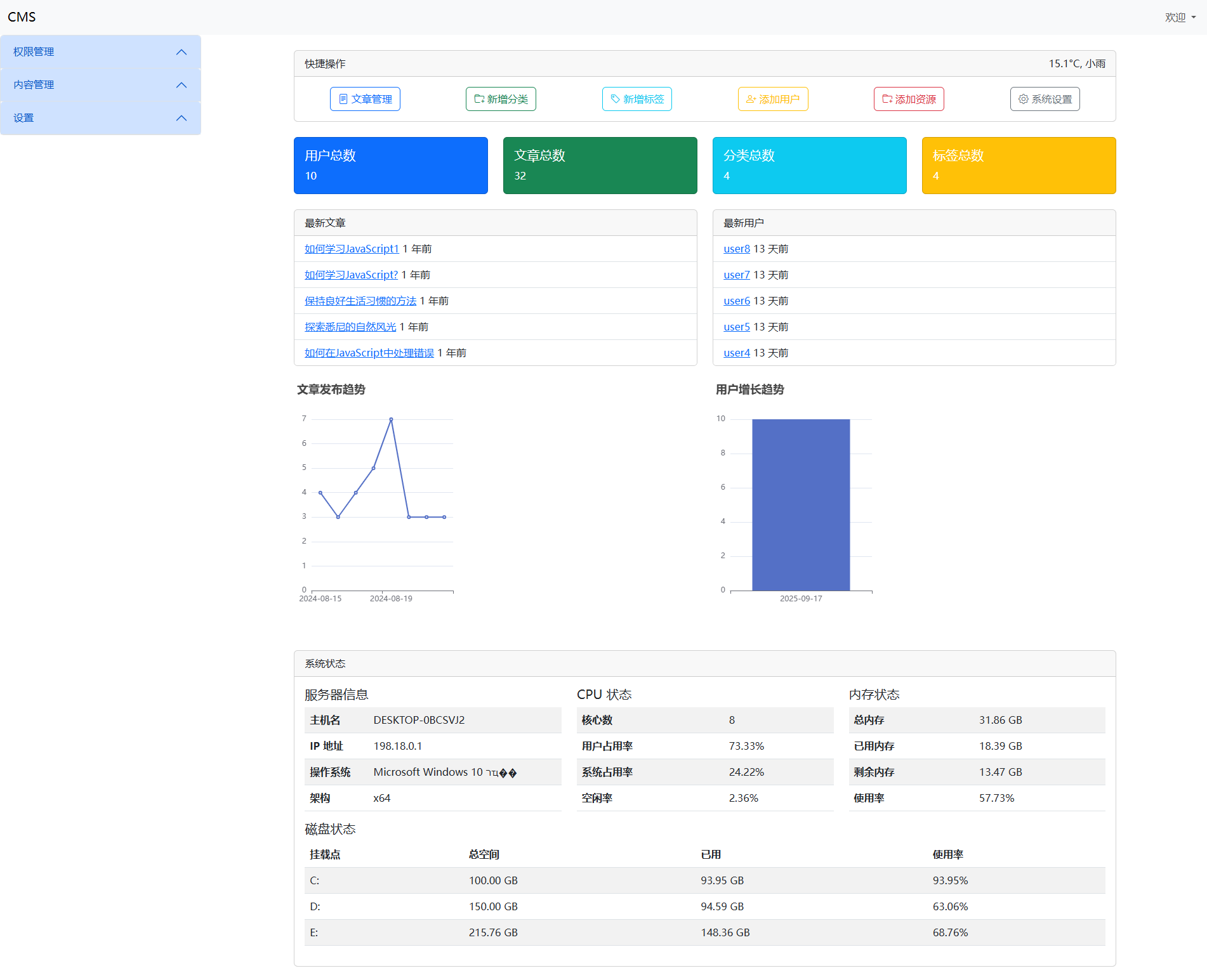
登录和退出
使用svg-captcha生成验证码
bash
npm install svg-captchautility.service
ts
import { Injectable } from '@nestjs/common';
// 导入 bcrypt 库,用于处理密码哈希和验证
import bcrypt from 'bcrypt';
// 导入 svgCaptcha 库,用于生成验证码
import svgCaptcha from 'svg-captcha';

// 使用 Injectable 装饰器将类标记为可注入的服务
@Injectable()
export class UtilityService {
  // 定义一个异步方法,用于生成密码的哈希值
  async hashPassword(password: string): Promise<string> {
    // 生成一个盐值,用于增强哈希的安全性
    const salt = await bcrypt.genSalt();
    // 使用生成的盐值对密码进行哈希,并返回哈希结果
    return bcrypt.hash(password, salt);
  }
  // 定义一个异步方法,用于比较输入的密码和存储的哈希值是否匹配
  async comparePassword(password: string, hash: string): Promise<boolean> {
    // 使用 bcrypt 的 compare 方法比较密码和哈希值,返回比较结果(true 或 false)
    return bcrypt.compare(password, hash);
  }
  generateCaptcha(options) {
    return svgCaptcha.create(options);
  }
}
auth.controller
ts
import { Controller, Get, Post, Body, Res, Session, Redirect } from '@nestjs/common';
import { UserService } from '../../share/services/user.service';
import { UtilityService } from '../../share/services/utility.service';
import type { Response } from 'express';

@Controller('admin')
export class AuthController {
  constructor(
    private readonly userService: UserService,
    private readonly utilityService: UtilityService,
  ) { }

  @Get('login')
  showLogin(@Res() res: Response) {
    res.render('auth/login', { layout: false });
  }

  @Post('login')
  async login(@Body() body, @Res() res: Response, @Session() session) {
    const { username, password, captcha } = body;
    if (captcha?.toLowerCase() !== session.captcha?.toLowerCase()) {
      return res.render('auth/login', { message: '验证码错误', layout: false });
    }
    const user = await this.userService.findOne({ where: { username }, relations: ['roles', 'roles.accesses'] });
    if (user && await this.utilityService.comparePassword(password, user.password)) {
      session.user = user;
      return res.redirect('/admin/dashboard');
    } else {
      return res.render('auth/login', { message: '用户名或密码错误', layout: false });
    }
  }

  @Get('captcha')
  getCaptcha(@Res() res: Response, @Session() session) {
    const captcha = this.utilityService.generateCaptcha({ size: 1, ignoreChars: '0o1il' });
    session.captcha = captcha.text;
    res.type('svg');
    res.send(captcha.data);
  }

  @Get('logout')
  @Redirect('login')
  logout(@Session() session) {
    session.user = null;
    return { url: 'login' };
  }
}
login.hbs
redis
bash
npm i redis connect-redis配置环境变量
REDIS_HOST=localhost
REDIS_PORT=6379
REDIS_PASSWORD=
configuration.service
ts
get redisHost(): string {
    return this.configService.get<string>('REDIS_HOST')!;
}
get redisPort(): number {
    return this.configService.get<number>('REDIS_PORT')!;
}
get redisPassword(): string {
    return this.configService.get<string>('REDIS_PASSWORD')!;
}
get redisConfig() {
    return {
        host: this.redisHost,
        port: this.redisPort,
        password: this.redisPassword
    }
}
redis.service
ts
import { Injectable, OnModuleDestroy } from '@nestjs/common';
import {createClient} from "redis"
import { ConfigurationService } from './configuration.service';

@Injectable()
export class RedisService implements OnModuleDestroy {
  private redisClient
  constructor(private configurationService: ConfigurationService) {
    this.redisClient = createClient()
    this.redisClient.connect().catch(console.error)
  }
  onModuleDestroy() {//当模块销毁的时候退出当前的客户端
    this.redisClient.quit();
  }
  getClient() {
    return this.redisClient;
  }
  async set(key: string, value: string, ttl?: number) {
    if (ttl) {
      await this.redisClient.set(key, value, 'EX', ttl)
    } else {
      await this.redisClient.set(key, value);
    }
  }
  async get(key: string) {
    return this.redisClient.get(key);
  }
  async del(key: string) {
    await this.redisClient.del(key)
  }
}
在share.service中注入
main.ts
ts
import { NestFactory } from '@nestjs/core';
import session from 'express-session';
import cookieParser from 'cookie-parser';
import { join } from 'node:path';
import { engine } from 'express-handlebars';
import { NestExpressApplication } from '@nestjs/platform-express';
import { AppModule } from './app.module';
import { DocumentBuilder, SwaggerModule } from '@nestjs/swagger';
import { ValidationPipe } from '@nestjs/common';
import { useContainer } from 'class-validator';
import * as helpers from './share/helpers';
import { RedisStore } from 'connect-redis';
import { RedisService } from './share/services/redis.service';

async function bootstrap() {
  // 使用 NestFactory 创建一个 NestExpressApplication 实例
  const app = await NestFactory.create<NestExpressApplication>(AppModule);
  // 使用 useContainer 配置依赖注入容器 让自定义校验器可以支持依赖注入
  useContainer(app.select(AppModule), { fallbackOnErrors: true });
  // 配置静态资源目录
  app.useStaticAssets(join(__dirname, '..', 'public'));
  // 设置视图文件的基本目录
  app.setBaseViewsDir(join(__dirname, '..', 'views'));
  // 设置视图引擎为 hbs(Handlebars)
  app.set('view engine', 'hbs');
  // 配置 Handlebars 引擎
  app.engine('hbs', engine({
    // 设置文件扩展名为 .hbs
    extname: '.hbs',
    helpers,
    // 配置运行时选项
    runtimeOptions: {
      // 允许默认情况下访问原型属性
      allowProtoPropertiesByDefault: true,
      // 允许默认情况下访问原型方法
      allowProtoMethodsByDefault: true,
    },
  }));
  // 配置 cookie 解析器
  app.use(cookieParser());
  const redisService = app.get(RedisService);
  const redisClient = redisService.getClient();
  const redisStore = new RedisStore({ client: redisClient });
  // 配置 session
  app.use(
    session({
      store: redisStore,
      secret: 'secret-key',
      resave: true, // 是否每次都重新保存
      saveUninitialized: true, // 是否保存未初始化的会话
      cookie: {
        maxAge: 1000 * 60 * 60 * 24 * 7, // 7天
      },
    }),
  );
  // 配置全局管道
  app.useGlobalPipes(new ValidationPipe({ transform: true }));
  // 配置 Swagger
  const config = new DocumentBuilder()
    // 设置标题
    .setTitle('CMS API')
    // 设置描述
    .setDescription('CMS API Description')
    // 设置版本
    .setVersion('1.0')
    // 设置标签
    .addTag('CMS')
    // 设置Cookie认证
    .addCookieAuth('connect.sid')
    // 设置Bearer认证
    .addBearerAuth({ type: 'http', scheme: 'bearer' })
    // 构建配置
    .build();
  // 使用配置对象创建 Swagger 文档
  const document = SwaggerModule.createDocument(app, config);
  // 设置 Swagger 模块的路径和文档对象,将 Swagger UI 绑定到 '/api-doc' 路径上
  SwaggerModule.setup('api-doc', app, document);
  await app.listen(process.env.PORT ?? 3000);
}
bootstrap();
refresh-token
api/controllers/auth.controller.ts
ts
// 导入所需的装饰器、模块和服务
import { Controller, Post, Body, Res, Request, UseGuards, Get } from '@nestjs/common';
import type { Response, Request as ExpressRequest } from 'express';
import { UserService } from '../../share/services/user.service';
import { UtilityService } from '../../share/services/utility.service';
import { JwtService } from '@nestjs/jwt';
import { ConfigurationService } from 'src/share/services/configuration.service';
import { AuthGuard } from '../guards/auth.guard';

// 声明控制器,路由前缀为 'api/auth'
@Controller('api/auth')
export class AuthController {
  // 构造函数,注入服务类
  constructor(
    private readonly userService: UserService,
    private readonly utilityService: UtilityService,
    private readonly jwtService: JwtService,
    private readonly configurationService: ConfigurationService,
  ) { }
  // 定义一个 POST 请求处理器,路径为 'login'
  @Post('login')
  async login(@Body() body, @Res() res: Response) {
    // 从请求体中获取用户名和密码
    const { username, password } = body;
    // 验证用户
    const user = await this.validateUser(username, password);
    // 如果用户验证通过
    if (user) {
      // 创建 JWT 令牌
      const tokens = this.createJwtTokens(user);
      // 返回成功响应,包含令牌信息
      return res.json({ success: true, ...tokens });
    }
    // 如果验证失败,返回 401 状态码和错误信息
    return res.status(401).json({ success: false, message: '用户名或密码错误' });
  }
  // 验证用户的私有方法
  private async validateUser(username: string, password: string) {
    // 查找用户,并获取其关联的角色和权限
    const user = await this.userService.findOne({ where: { username }, relations: ['roles', 'roles.accesses'] });
    // 如果用户存在并且密码匹配
    if (user && await this.utilityService.comparePassword(password, user.password)) {
      // 返回用户信息
      return user;
    }
    // 否则返回 null
    return null;
  }
  // 创建 JWT 令牌的私有方法
  private createJwtTokens(user: any) {
    // 创建访问令牌,设置过期时间为 30 分钟
    const access_token = this.jwtService.sign({ id: user.id, username: user.username }, {
      secret: this.configurationService.jwtSecret,
      expiresIn: '30m',
    });
    // 创建刷新令牌,设置过期时间为 7 天
    const refresh_token = this.jwtService.sign({ id: user.id, username: user.username }, {
      secret: this.configurationService.jwtSecret,
      expiresIn: '7d',
    });
    // 返回令牌信息
    return { access_token, refresh_token };
  }
  @UseGuards(AuthGuard)
  @Get('profile')
  getProfile(@Request() req: ExpressRequest, @Res() res: Response) {
    return res.json({ user: req.user });
  }

  @Post('refresh-token')
  async refreshToken(@Body() body, @Res() res: Response) {
    const { refresh_token } = body;
    try {
      const decoded = this.jwtService.verify(refresh_token, { secret: this.configurationService.jwtSecret });
      const tokens = this.createJwtTokens(decoded);
      return res.json({ success: true, ...tokens });
    } catch (error) {
      return res.status(401).json({ success: false, message: 'Refresh token无效或已过期' });
    }
  }
}
index.html
html
<!DOCTYPE html>
<html lang="en">

<head>
  <meta charset="UTF-8">
  <meta name="viewport" content="width=device-width, initial-scale=1.0">
  <title>CMS首页</title>
  <link href="/css/bootstrap.min.css" rel="stylesheet" />
  <link href="/css/bootstrap-icons.min.css" rel="stylesheet">
  <script src="/js/jquery.min.js"></script>
  <script src="/js/bootstrap.bundle.min.js"></script>
  <script src="/js/htmx.min.js"></script>
  <script src="/js/handlebars.min.js"></script>
  <script src="/js/client-side-templates.js"></script>
</head>

<body>
  <header class="navbar navbar-expand-lg navbar-light bg-light">
    <div class="container-fluid">
      <a class="navbar-brand" href="#">CMS首页</a>
      <div id="profile-container" class="d-flex" hx-get="/api/auth/profile" hx-trigger="load"
        hx-ext="client-side-templates" handlebars-template="profile-template" hx-swap="innerHTML">
      </div>
    </div>
  </header>
  <script id="profile-template" type="text/x-handlebars-template">
       <span>欢迎, {{user.username}}</span>
   </script>
  <script>
    async function refreshAccessToken() {
      try {
        const response = await fetch(' /api/auth/refresh-token', {
          method: 'POST',
          headers: { 'Content-Type': 'application/json' },
          body: JSON.stringify({
            refresh_token: localStorage.getItem('refresh_token')
          })
        });
        const data = await response.json(); if (data.success) {
          localStorage.setItem('access_token', data.access_token);
          localStorage.setItem('refresh_token', data.refresh_token);
        } else {
          console.error('刷新access_token失败');
          window.location.href = '/login.html';
          return false;
        }
        return true;
      } catch (error) {
        console.error('刷新access_token时出错', error);
        window.location.href = '/login.html';
        return false;
      }
    }
    $('body').on('htmx:configRequest', function (event) {
      const accessToken = localStorage.getItem('access_token');
      if (accessToken) {
        event.detail.headers['Authorization'] = `Bearer ${accessToken}`;
      }
    });
    $('#profile-container').on('htmx:afterOnLoad', async function (event) {
      if (event.detail.xhr.status === 401) {
        const success = await refreshAccessToken();
        if (success) {
          const accessToken = localStorage.getItem('access_token');
          fetch(`/api/auth/profile`, { headers: { Authorization: `Bearer ${accessToken}` } })
            .then(response => response.json())
            .then(data => {
              const templateSource = document.getElementById('profile-template').innerHTML;
              const template = Handlebars.compile(templateSource);
              const html = template({
                user: data.user
              });
              $('#profile-container').html(html);
              htmx.process(document.getElementById('profile-container'));
            })
            .catch(error => console.error('Error fetching profile:', error));
        }
      }
    });
  </script>
</body>

</html>
login.html
html
<!DOCTYPE html>
<html lang="en">

<head>
  <meta charset="UTF-8">
  <meta name="viewport" content="width=device-width, initial-scale=1.0">
  <title>登录</title>
  <link href="/css/bootstrap.min.css" rel="stylesheet" />
  <link href="/css/bootstrap-icons.min.css" rel="stylesheet">
  <script src="/js/jquery.min.js"></script>
  <script src="/js/bootstrap.bundle.min.js"></script>
  <script src="/js/htmx.min.js"></script>
</head>

<body>
  <div class="container">
    <h2 class="mt-5">登录</h2>
    <ul class="nav nav-tabs" id="loginTabs" role="tablist">
      <li class="nav-item" role="presentation">
        <a class="nav-link active" id="password-login-tab" data-bs-toggle="tab" href="#password-login" role="tab"
          aria-controls="password-login" aria-selected="true">密码登录</a>
      </li>
    </ul>
    <div class="tab-content" id="loginTabContent">
      <div class="tab-pane fade show active" id="password-login" role="tabpanel" aria-labelledby="password-login-tab">
        <div class="mt-3">
          <label for="username" class="form-label">用户名</label>
          <input type="text" class="form-control" id="username" name="username" required>
        </div>
        <div class="mt-3">
          <label for="password" class="form-label">密码</label>
          <input type="password" class="form-control" id="password" name="password" required>
        </div>
        <button id="passwordLoginButton" class="btn btn-primary mt-3" hx-post="/api/auth/login" hx-trigger="click"
          hx-include="#username,#password" hx-swap="none">登录</button>
      </div>
    </div>
    <div id="errorMessage" class="alert alert-danger d-none mt-3"></div>
    <div class="toast-container position-fixed bottom-0 end-0 p-3">
      <div id="toastMessage" class="toast" role="alert" aria-live="assertive" aria-atomic="true">
        <div class="toast-header">
          <strong class="me-auto">提示</strong>
          <button type="button" class="btn-close" data-bs-dismiss="toast" aria-label="Close"></button>
        </div>
        <div class="toast-body" id="toastBody"></div>
      </div>
    </div>
  </div>
  <script>
    //显示提示信息的函数
    function showToast(message) {
      // 设置提示框的文本内容
      $('#toastBody').text(message);
      // 创建 Bootstrap Toast 实例
      const toast = new bootstrap.Toast(document.getElementById('toastMessage'));
      // 显示提示框
      toast.show();
    }
    // 处理登录响应的函数
    function handleLoginResponse(event) {
      // 解析 AJAX 请求的响应内容
      const result = JSON.parse(event.detail.xhr.responseText);
      // 如果登录成功
      if (result.success) {
        // 将 access_token 和 refresh_token 存储到本地存储中
        localStorage.setItem('access_token', result.access_token);
        localStorage.setItem('refresh_token', result.refresh_token)
        // 重定向到首页
        window.location.href = '/';
      } else {
        // 如果登录失败,显示错误信息
        showToast(result.message);
      }
    }
    // 处理发送验证码响应的函数
    function handleSendCodeResponse(event) {
      // 解析 AJAX 请求的响应内容
      const result = JSON.parse(event.detail.xhr.responseText);
      // 显示响应信息
      showToast(result.message);
    }
    // jQuery 文档就绪函数
    $(function () {
      // 为登录按钮绑定事件,当 AJAX 请求完成后调用 handleLoginResponse 函数
      $('#passwordLoginButton').on('htmx:afterRequest', handleLoginResponse);
    });
  </script>
</body>

</html>